
AI development services reduce costs by turning repetitive, rules-based, and knowledge-heavy work into reliable assisted workflows. The goal is not to “replace everyone with AI,” but to remove avoidable manual effort, shorten turnaround times, improve first-pass quality, and help staff spend more time on higher-value work. This how-to guide shows how to identify the right use cases, choose practical AI solutions, integrate them safely, and measure savings without overbuilding.
Where do AI development services save the most money?
AI development services save the most money in workflows where employees repeatedly search, summarize, classify, draft, route, check, or answer similar questions. Research supports this pattern: McKinsey estimated that generative AI could create $2.6 trillion to $4.4 trillion in annual value across use cases, with about three-quarters of that value concentrated in customer operations, marketing and sales, software engineering, and R&D. (mckinsey.com)
That matters because cost reduction rarely comes from a single “AI app.” It usually comes from small time savings repeated across thousands of tickets, documents, messages, invoices, development tasks, or internal requests. NBER research on 5,179 customer support agents found that AI assistance increased productivity by nearly 14% on average, with 35% gains for novice and lower-skilled workers. (nber.org)
A practical AI software development plan should therefore begin with the work that already consumes staff time every week. Typical opportunities include:
Customer support: triage, suggested replies, self-service answers, escalation routing, and call or chat summaries.
Operations: document extraction, invoice checks, compliance review support, scheduling, and internal request handling.
Sales and marketing: lead research, proposal drafts, content variations, CRM updates, and campaign analysis.
Software teams: code documentation, test generation, refactoring support, bug reproduction, and developer knowledge search.
HR and finance: policy questions, onboarding support, report generation, payroll query routing, and variance explanations.
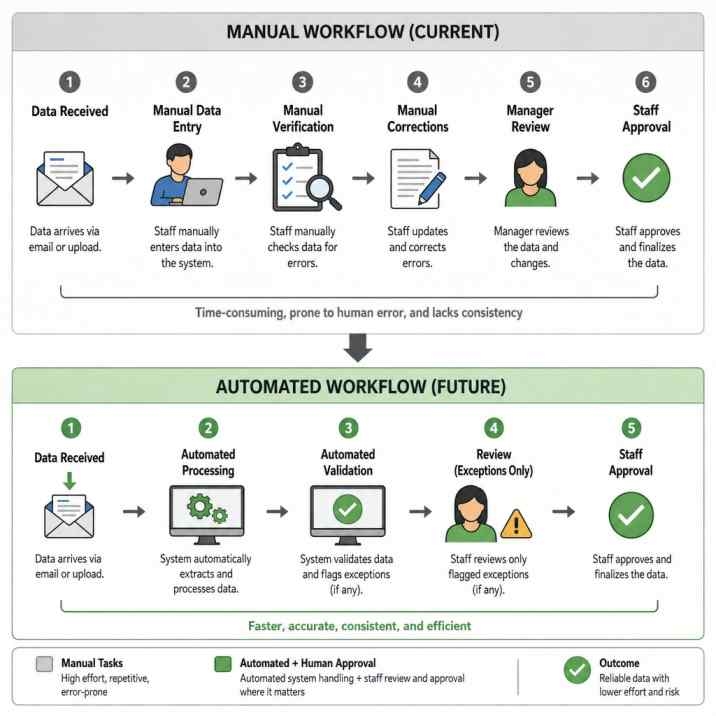
Step 1: Map the work that drains staff time
Start by listing the tasks employees repeat often, especially tasks that involve moving information from one system to another. Do not begin with the technology. Begin with the calendar, ticket queue, inbox, CRM, help desk, spreadsheet, or project board where time is actually disappearing.
Ask managers and frontline staff to identify tasks that meet at least three of these conditions:
The task happens daily or weekly.
The task follows a recognizable pattern.
The task requires searching, summarizing, classifying, drafting, or checking information.
The task delays customers, internal teams, or revenue-generating work.
The task is disliked because it is repetitive, not because it requires expert judgment.
The task produces measurable outputs, such as resolved tickets, processed claims, completed forms, or shipped code.
This step prevents a common AI mistake: automating work that is interesting but not expensive. A flashy chatbot that answers rare questions may deliver less value than an internal AI assistant that saves every employee 15 minutes a day searching policies, templates, or order details.
Step 2: Calculate the baseline cost before building
Before choosing ai solutions, calculate the current cost of the workflow. A simple baseline gives you a way to prove whether the project worked after launch.
Use a practical formula:
Count how many times the task happens per month.
Estimate the average minutes required per task.
Multiply by the fully loaded hourly cost of the staff involved.
Add related costs, such as rework, delays, escalations, overtime, or outsourced processing.
Note quality problems, such as missed fields, inconsistent responses, or duplicate work.
For example, if a support team handles 8,000 repetitive tickets per month and each ticket takes six minutes, the workflow consumes about 800 staff hours monthly. If AI reduces average handling time, improves routing, or drafts better first replies, savings can be modeled against that baseline. Keep the calculation honest: include review time, AI tool costs, integration work, and ongoing monitoring.
Step 3: Choose use cases that fit AI instead of forcing AI everywhere
AI is strongest when it assists decisions, drafts outputs, retrieves knowledge, or automates predictable workflow steps. It is weaker when the task depends on unclear ownership, poor source data, high emotional sensitivity, or decisions that require strict human accountability.
Prioritize use cases with high volume and manageable risk. Good first projects include:
AI chatbot development services for customer or employee self-service.
AI integration services that connect existing CRMs, ERPs, help desks, or document systems.
AI software development for internal tools that summarize, classify, or generate structured outputs.
Custom AI development services for proprietary workflows where off-the-shelf software does not match your process.
Avoid starting with broad promises such as “automate customer service” or “make every department AI-powered.” Instead, define a narrow outcome: reduce manual ticket tagging, draft knowledge-base answers, extract data from supplier invoices, or help developers generate unit tests.
Step 4: Select the right AI solution type
Once you know the use case, select the simplest solution that can meet the goal. Overbuilding increases cost, delays adoption, and creates maintenance work your staff may not be ready to own.
A practical selection path looks like this:
Use existing software features first when your current help desk, CRM, analytics, or collaboration platform already includes safe AI tools.
Add AI integration services when your data lives across multiple systems and staff lose time switching tabs, copying records, or searching disconnected sources.
Use ai chatbot development services when users ask repeated questions and the answer can be grounded in approved knowledge, account data, order status, or workflow rules.
Invest in Custom AI development services when the workflow is unique, high-value, regulated, or tightly connected to proprietary data and business logic.
Build custom models only when necessary because training advanced models can be expensive. Stanford’s AI Index reported estimated compute costs of $78 million for GPT-4 and $191 million for Gemini Ultra, which shows why most businesses should adapt, integrate, or fine-tune existing models rather than train foundation models from scratch. (hai.stanford.edu)
The best choice is usually the one that solves the cost problem with the fewest moving parts.
Step 5: Clean and connect the data AI needs
AI cannot save staff time if employees must manually correct every answer. Most failed AI projects are not model failures; they are data, access, and workflow failures.
Prepare the knowledge sources before development begins. Remove outdated policies, duplicate articles, conflicting templates, and abandoned spreadsheets. Decide which systems the AI can read, which systems it can write to, and which actions require human approval.
For a customer service chatbot, this may include product documentation, shipping rules, refund policies, ticket history, CRM fields, and escalation criteria. For an internal operations assistant, it may include standard operating procedures, forms, contract clauses, approval flows, and system records. For ai software development teams, it may include repositories, code standards, architecture notes, backlog items, and testing requirements.
The cleaner the data, the less time staff spend checking AI output. The clearer the permissions, the lower the risk of exposing information to the wrong user.
Step 6: Build human review into the workflow
Cost savings improve when AI is embedded into the way employees already work. A separate tool that requires staff to copy, paste, and verify information may add friction instead of reducing it.
Design the workflow so AI handles the first draft, first classification, first summary, or first recommendation. Then let a person approve, edit, reject, or escalate. This keeps accountability with the team while removing the slowest parts of the task.
Common human-in-the-loop patterns include:
AI drafts a customer reply, and an agent approves it.
AI summarizes a call, and the account manager edits the summary before saving it.
AI extracts invoice fields, and finance staff approve exceptions.
AI suggests code tests, and developers review them before committing.
AI routes a ticket, and supervisors audit a sample for quality.
This approach also supports adoption. Employees are more likely to trust AI when it helps them work faster without forcing them to surrender control over judgment-heavy decisions.
How can AI chatbot development services reduce support costs?
AI chatbot development services reduce support costs by deflecting repetitive questions, collecting context before handoff, guiding customers through known processes, and giving agents better suggested responses. The strongest chatbot use cases are not vague conversations; they are action-oriented support flows connected to approved knowledge and business systems.
A useful chatbot should be able to do more than answer FAQs. It should identify the customer’s intent, ask for missing details, retrieve relevant account or order information when permitted, and escalate with a clean summary when human help is needed. Gartner has warned that customers are more likely to use third-party GenAI than company-provided chatbots when company bots are not useful, which is why support leaders should design conversational, action-oriented experiences rather than treating GenAI as a standalone chatbot. (gartner.com)
To keep chatbot savings realistic, build around these steps:
Start with the top 20–50 repetitive support intents.
Write approved answers and escalation rules for each intent.
Connect the chatbot to systems only when the use case requires it.
Add fallback paths for uncertainty, frustration, or sensitive issues.
Measure containment, customer satisfaction, escalation quality, and agent time saved.
Review failed conversations weekly and update the knowledge base.
A chatbot that traps customers in loops can increase costs by creating repeat contacts. A chatbot that resolves simple questions and hands off complex ones with context can reduce both customer effort and agent workload.
Step 7: Use AI to speed up software delivery
AI development services can also save staff time inside engineering teams. AI coding assistants are not a substitute for architecture, security, or senior engineering judgment, but they can reduce time spent on boilerplate, documentation, test generation, code explanation, and routine refactoring.
A controlled study published by Microsoft Research found that developers with access to GitHub Copilot completed a programming task 55.8% faster than the control group. (microsoft.com) The practical implication is not that every software project becomes 55.8% cheaper. It means selected coding tasks can move faster when developers know how to use AI well and still review output carefully.
Use AI in software teams by applying it to specific development bottlenecks:
Generate first-draft unit tests for existing code.
Summarize unfamiliar codebases for new team members.
Draft API documentation and release notes.
Suggest refactoring options for repetitive patterns.
Create sample data, validation logic, or internal tooling scripts.
Help QA teams turn acceptance criteria into test cases.
Pair AI with coding standards, secure development practices, and review gates. This keeps speed gains from turning into rework, vulnerabilities, or inconsistent code.
Step 8: Integrate AI into existing systems
AI integration services are often where the real staff-time savings appear. Employees do not want another dashboard. They want fewer clicks, fewer duplicate entries, faster answers, and smoother handoffs.
Good integration connects AI with the tools staff already use, such as help desks, CRMs, ERPs, email, document repositories, collaboration platforms, analytics tools, and internal databases. For example, a support agent should not have to ask an AI assistant a question, copy the answer, search the CRM, open the order system, and then manually update the ticket. The better workflow is one guided experience that retrieves context, drafts the reply, recommends the next action, and saves the approved summary.
Integration also controls cost. Without integration, staff still perform the manual steps around the AI output. With integration, the AI solution can remove entire handoffs, reduce waiting time, and standardize how work moves from request to resolution.
Step 9: Pilot before scaling
Run a pilot with one team, one workflow, and clear success metrics. A pilot should be large enough to produce useful data but small enough to fix quickly.
Track metrics such as:
Average handling time.
Tickets or tasks completed per hour.
First-contact resolution.
Rework rate.
Escalation rate.
Staff satisfaction.
Customer satisfaction.
Cost per completed task.
AI acceptance, edit, and rejection rates.
Compare pilot results with the baseline from Step 2. If time savings appear but quality drops, tune prompts, improve data, add review rules, or narrow the use case. If quality improves but staff do not use the tool, reduce friction and train around real tasks instead of abstract AI features.
Step 10: Train staff for adoption, not just access
Giving employees access to AI does not automatically save time. Staff need to know when to use it, how to check it, and where human judgment remains essential.
Training should be role-specific. Support agents need guidance on suggested replies, escalation summaries, and tone review. Finance teams need rules for exceptions and audit trails. Developers need secure coding practices, review expectations, and limits on generated code. Managers need dashboards that separate true productivity gains from simple activity increases.
The NBER customer support study is useful here because it found the largest productivity gains among less experienced workers. (nber.org) That suggests AI can help standardize good practices, shorten ramp time, and reduce dependency on a small group of experts—but only if the organization captures expert knowledge and turns it into guided workflows.
Step 11: Measure savings and improve continuously
After launch, measure the same metrics you used in the baseline. Do not rely only on user excitement or demo quality. The question is whether the AI solution reduces cost, saves staff time, improves quality, or increases capacity without adding headcount.
A monthly AI performance review should cover:
Which tasks were automated or assisted.
How many hours were saved.
Whether output quality improved, declined, or stayed stable.
How often humans overrode AI recommendations.
Which failures caused rework or customer frustration.
Whether the knowledge base needs updates.
Whether the use case is ready to scale.
Continuous improvement is where custom AI development services (read) can outperform one-size-fits-all tools. A custom system can be tuned around your terminology, approval rules, customer journeys, integrations, and internal data structure.
What should you look for in an AI development partner?
Look for an AI development partner that can connect business goals, software engineering, data readiness, integration, security, and adoption. The partner should help you reduce cost per workflow, not simply deliver a model or chatbot.
PrimaFelicitas describes its AI development services as covering AI-based customer service, automation, data analysis, and related AI solutions, and its wider service pages position the company around consulting, design thinking, development, re-engineering, project rescue, and support and maintenance. (primafelicitas.com) For businesses comparing vendors, that end-to-end capability matters because AI cost savings depend on discovery, build quality, integration, rollout, and post-launch tuning.
When evaluating any provider, ask for:
A use-case discovery process tied to measurable savings.
Experience with ai integration services, not just model prompts.
Clear data security and permission controls.
Human-in-the-loop workflow design.
Testing for accuracy, bias, privacy, and failure modes.
Post-launch monitoring and improvement.
Documentation that your team can maintain.
If you searched for “PriimaFelicitas,” the company name is commonly presented as PrimaFelicitas in its public service pages. The important evaluation point is whether the provider can turn AI into operational savings rather than isolated experiments.
Competitor analysis: off-the-shelf tools versus custom AI development
Because no specific competitor was supplied, the most useful comparison is against the common alternatives businesses evaluate: off-the-shelf AI platforms, generic chatbot vendors, large consulting firms, and freelance AI developers.
Off-the-shelf AI platforms are strong when you need speed, familiar interfaces, and standard features. They are often good for general writing assistance, meeting summaries, basic analytics, and simple knowledge search. Their weakness is that they may not match your unique approval flows, data permissions, legacy systems, or industry-specific workflows.
Generic chatbot vendors can be effective for FAQ deflection and basic support automation. Their weakness appears when the chatbot must connect deeply to order systems, internal policies, account permissions, or complex escalation logic. If the bot cannot take useful action, staff may still do most of the work manually.
Large consulting firms can bring strategy, governance, and transformation experience. Their weakness for some companies is cost, speed, or a delivery model that may be heavier than a focused implementation requires. Freelancers can move quickly and affordably, but they may lack the capacity for enterprise-grade integration, security, testing, and long-term support.
A focused AI software development partner differentiates itself by combining practical discovery, custom build capability, integration, and continuous optimization. That is the middle ground many organizations need: more tailored than a plug-in tool, but more implementation-focused than a broad transformation program.
Read this guide : https://primafelicitas.com/artificial-intelligence/ai-development-services-for-your-business/
A practical cost-saving checklist
Before investing in AI development services, confirm that your project meets these conditions:
The workflow is frequent enough to justify automation.
The current cost is measured or reasonably estimated.
The source data is accurate, accessible, and permissioned.
The AI output can be reviewed where risk is meaningful.
The solution integrates with tools staff already use.
Success metrics are defined before development starts.
Employees understand how AI helps their role.
The project has an owner after launch.
The business case includes maintenance, monitoring, and improvement.
If several items are missing, pause and fix the operating model before building. AI works best when process, data, people, and software move together.
The best results come from targeted automation
AI reduces costs when it is applied to specific, measurable workflows that drain staff time. Start with repetitive tasks, calculate the baseline, select the right solution type, integrate with existing systems, keep humans in the loop, and measure results after launch.
AI development services, ai chatbot development services, ai integration services, and Custom AI development services can all create value, but only when they are tied to a clear operational outcome. Build for saved hours, faster resolution, fewer handoffs, and better staff focus—not for AI novelty alone.






