Today, many businesses want to understand how work is being done during office hours. One common method is to track which applications employees use on their computers. Companies track application usage on employee computers to improve productivity, reduce time waste, protect company data, and support better work management.
With more employees working remotely and using different software tools every day, businesses need clear visibility into application usage. This helps managers understand work patterns, identify software needs, and make informed business decisions.
In this guide, you will learn why companies track application usage on employee computers, how it works, its benefits, legal considerations, and the best practices businesses should follow.
What Does It Mean When Companies Track Application Usage on Employee Computers?
Application usage tracking is the process of recording which software applications employees use during work hours. The tracking system collects information such as:
Applications opened on the computer
Time spent on each application
Frequency of application usage
Active and idle time
Software usage trends
Productivity-related activities
When companies track application usage on employee computers, they are not necessarily monitoring personal activities. Most businesses focus on understanding how work-related applications are being used.
For example, a company may want to know:
How much time employees spend in project management tools
Whether expensive software licenses are being used
Which applications help teams work efficiently
Which tools are rarely used
Why Companies Track Application Usage on Employee Computers
There are several reasons businesses choose to monitor software usage.
Improve Employee Productivity
One major reason companies track application usage on employee computers is to understand productivity levels.
Managers can see:
Time spent on work-related software
Time spent on non-work applications
Application switching patterns
Productivity trends across teams
This information helps organizations improve workflows and remove productivity barriers.
Better Software Investment Decisions
Software subscriptions can be expensive.
By tracking application usage, companies can identify:
Frequently used applications
Unused licenses
Duplicate software
Tools that employees need
This helps reduce unnecessary software expenses.
Strengthen Data Security
Security is another important reason companies track application usage on employee computers.
Businesses can detect:
Unauthorized software installations
Risky applications
Potential security threats
Unapproved file-sharing tools
This helps protect sensitive company information.
Support Remote Work Management
Remote and hybrid work environments make visibility more important.
Tracking application usage helps managers:
Understand employee work patterns
Measure software engagement
Monitor project-related activities
Improve team collaboration
Ensure Policy Compliance
Many companies have workplace policies regarding software usage.
Application tracking helps organizations ensure employees use approved tools and follow company guidelines.
How Companies Track Application Usage on Employee Computers
Modern employee monitoring software makes application tracking simple.
The process usually includes:
Activity Monitoring
The software records applications that employees open and use during work hours.
Time Tracking
The system measures how long an application remains active on the screen.
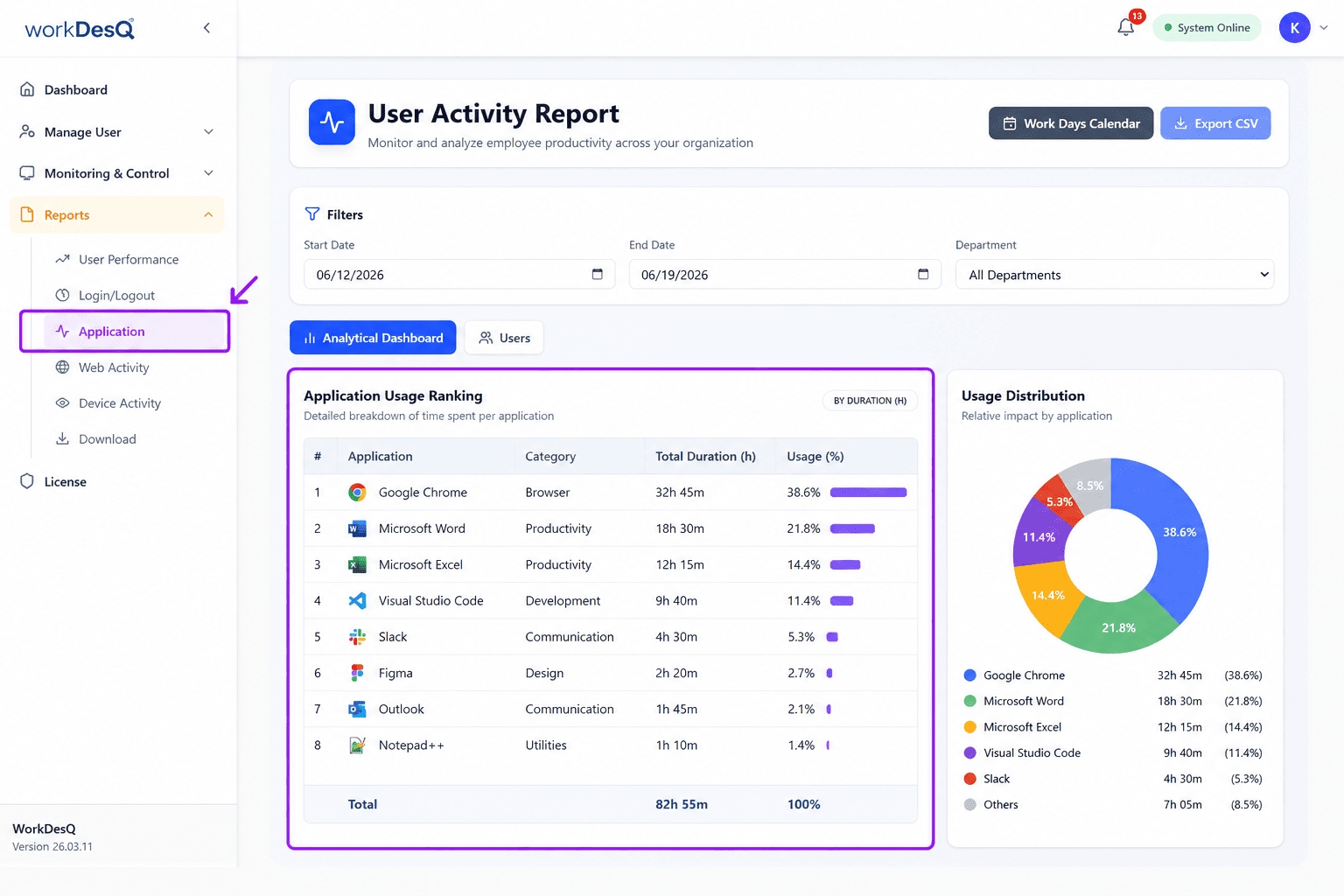
Usage Reports
Managers receive reports showing:
Most used applications
Least used applications
Daily usage trends
Team productivity insights
Dashboard Analytics
Many solutions provide visual dashboards that make data easier to understand.
Platforms such as WorkDesQ help organizations monitor application usage while providing productivity insights and workforce management features.
Benefits When Companies Track Application Usage on Employee Computers
Businesses gain several advantages from application monitoring.
Increased Productivity
Tracking helps identify distractions and encourages better time management.
Improved Resource Allocation
Organizations can invest in tools employees actually use.
Cost Savings
Unused software licenses can be removed, reducing expenses.
Better Workforce Planning
Managers gain insights into workload distribution and software requirements.
Enhanced Security
Unauthorized applications can be detected quickly before they create risks.
Common Applications Businesses Monitor
When companies track application usage on employee computers, they often focus on business-related software such as:
Project management tools
Communication platforms
CRM software
Accounting applications
Customer support systems
Development tools
Design software
Productivity applications
The goal is usually to understand business performance rather than personal behavior.
Is It Legal for Companies to Track Application Usage on Employee Computers?
In many countries, employee monitoring is legal when businesses follow applicable laws and maintain transparency.
Best practices include:
Inform employees about monitoring policies
Clearly explain collected data
Use monitoring for legitimate business purposes
Protect employee privacy
Follow local labor regulations
Companies should always create clear policies before implementing monitoring systems.
Best Practices for Businesses
If companies track application usage on employee computers, they should follow responsible monitoring practices.
Be Transparent
Employees should know what is being tracked and why.
Focus on Improvement
Monitoring should help improve workflows rather than create unnecessary pressure.
Respect Privacy
Only collect information necessary for business operations.
Use Reliable Software
Choose trusted solutions that provide accurate reporting and secure data handling.
Review Reports Regularly
Monitoring data becomes valuable only when businesses use it to make better decisions.
Signs Your Business Should Start Tracking Application Usage
Your company may benefit from application tracking if:
Productivity levels are unclear
Software costs are increasing
Remote teams are growing
Security concerns exist
Workload distribution is difficult to measure
Managers lack visibility into daily operations
These challenges often indicate the need for better workforce insights.
Choosing the Right Application Usage Tracking Software
Before selecting a solution, look for features such as:
Real-time application tracking
Productivity reports
Time tracking
Employee activity monitoring
Easy-to-use dashboards
Data security controls
Remote workforce support
WorkDesQ is one option businesses use to track application usage, monitor productivity, manage attendance, and gain better visibility into employee work activities.
Conclusion
As workplaces continue to evolve, companies track application usage on employee computers to improve productivity, strengthen security, and make smarter software investment decisions. When implemented transparently and responsibly, application tracking helps organizations understand how work gets done and where improvements can be made.
The key is balancing business visibility with employee trust. Companies that use monitoring data fairly and focus on productivity improvement often achieve better results while maintaining a positive workplace culture.