
In SAP, each business document must be provided with a number for identification purposes. However, numbers in SAP are assigned according to specific rules. The concept of number ranges is a crucial part for any student studying through an SAP FICO Course since they play a significant role in accounting. The use of number ranges allows finding the document easily for verification, and incorrect settings may lead to errors when a user tries to save a document.
Key Takeaways
Number ranges in SAP are used for the generation of document IDs.
Numbers can be assigned automatically by SAP or inputted manually.
Settings of document type and fiscal year have influence on the assignment of numbers.
Unsuccessful transactions may cause gaps in document numbers.
How SAP Number Ranges Work?
A number range refers to a series of numbers that SAP uses for some specific reason. It has a starting number and an ending number. SAP manages the number range and assigns numbers according to its settings.
For instance, a number range starts at 500000 and ends at 500999. SAP may assign numbers within this number range when the associated business document is generated.
The major components include:
Number range object: It manages the assignment of numbers for a certain kind of document type.
Interval: It determines the starting and ending numbers.
Number status current: It indicates the number range position.
Assignment Rule: It helps to determine how the number is assigned.
In SAP FICO Training, it is important to know these components rather than the transaction codes.
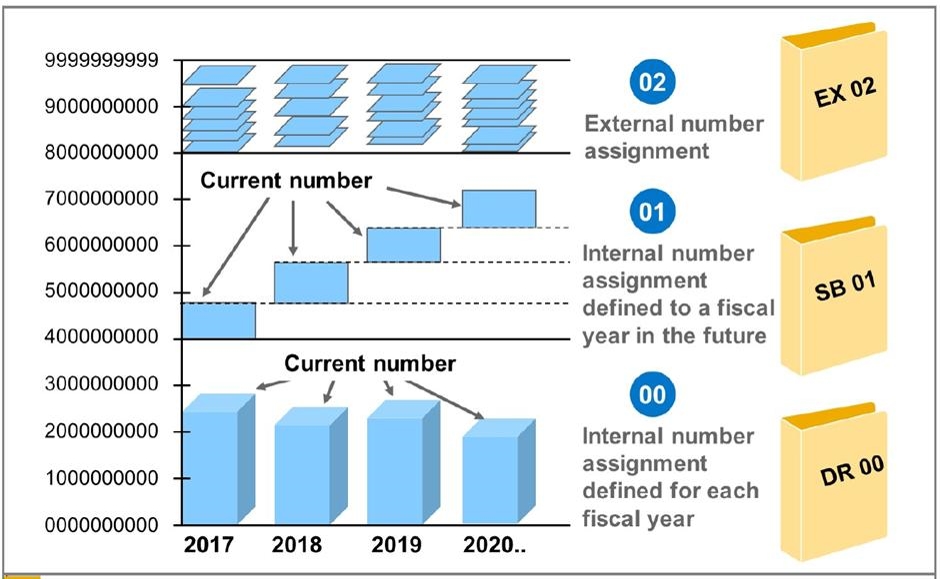
Internal and External Number Assignment
Numbering is done by SAP through two methods. Internal Numbering: SAP automatically generates the number when the document is created.
External Numbering: The number is provided by either the user or any other system. SAP validates the number based on the type of document.
Feature | Internal | External |
Number source | SAP | User or another system |
Number entry | Automatic | Entered or supplied |
Common use | Regular document creation | Data transfer |
Main check | Available interval | Valid and acceptable number |
How SAP Selects a Number?
The system never uses any available number without looking at its parameters. For example, the document type is associated with a certain number range in Financial Accounting. This information is used to define the right interval.
The following algorithm is typical for the situation:
A user initiates a transaction of the financial kind.
The system identifies the document type.
The assigned number range is determined.
It checks the availability of a number.
The number is assigned to the document.
Other controls determine the possibility of posting.
An appropriate number does not guarantee the post of the entire document. It may be refused due to such reasons as an inappropriate account, a closed posting period, etc. An SAP FICO Course in Hyderabad can help learners understand this by practising document creation and number range checks in a training system.
Why Do Document Numbers May Have Gaps?
Sometimes the document numbers might not be in a linear fashion. This can occur in a situation whereby SAP creates the number, but the transaction fails.
Buffering of the number range could also lead to such situations. At times SAP keeps some numbers in reserve for the purposes of speeding up the process. When the process gets interrupted by any means, some numbers go unused.
The presence of gaps does not mean that the document is missing. This requires a verification of the status and errors of the document. In SAP FICO Classes in Pune, learners can practise tracing a document from its type to its number range. This helps them understand why SAP assigns a particular number.
Fiscal Year and Number Range Settings
Depending on the configuration that has been set up for the document type, some SAP number ranges will restart for a new fiscal year, whereas some will carry forward from the last year.
Before the new financial year begins, it must be verified whether the necessary number ranges have been created. If a range is not created or does not contain any numbers, then document creation could fail.
SAP FICO certification learners need to practice checking fiscal year setups and document type setups in a testing environment.
How to Find Number Range Errors?
When SAP reports an error in the number range, you should not tweak any settings randomly. You first need to establish the cause of this error.
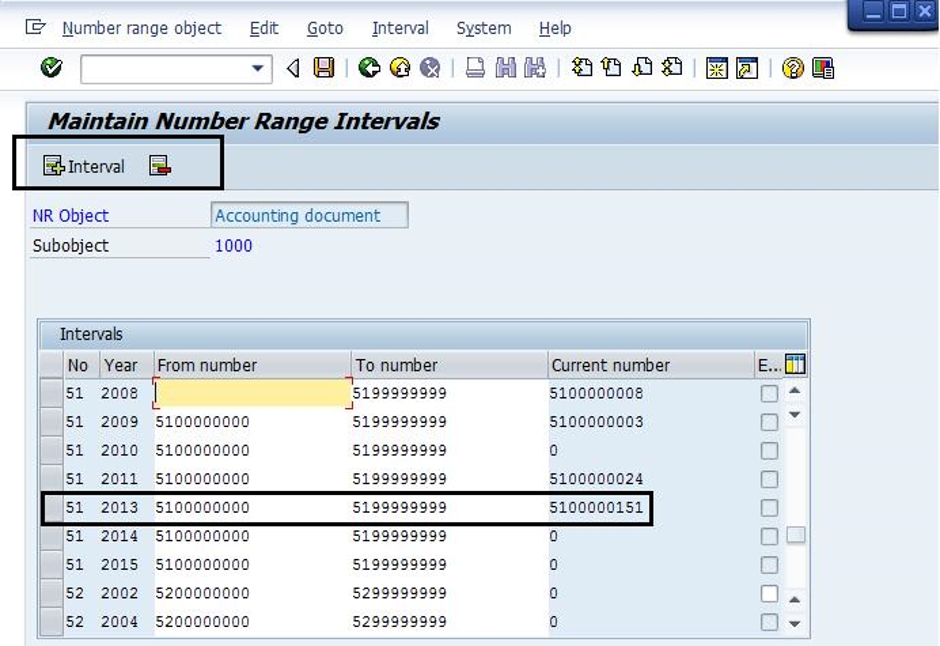
Use FBN1 to determine Financial Accounting document number ranges within SAP GUI.
Use OBA7 to verify the document type settings on compatible SAP GUI systems.
Use SNRO to inspect the respective number range objects.
See if there are enough numbers in the interval.
See if the right interval is assigned to the document type.
Sum up,
Number ranges of SAP may appear to be a small setting; however, it has a vital role in managing the documents. The interval setting allows SAP to generate ID numbers and manage business documents. An understanding of the intervals, document type and financial year will enable one to easily find out the mistakes made during operation. In addition, it is crucial to know that a break in the document numbering sequence does not necessarily mean there is a problem. Through consistent practice, one is able to comprehend these settings and resolve issues that arise.