Introduction
In many SAP integration projects, the information needed to process a business message does not sit in one system. An order may come from SAP S/4HANA, while customer details live in another application. Shipping information often comes from third-party APIs. Content Enricher becomes useful in SAP CPI in such cases. It enables users to get extra information and add it to the original message. One can join SAP CPI Course Online for the best learning experience.
Why Content Enricher Matters in Real Integrations
Imagine an order message arriving from an SAP system. It contains an order number and customer ID. The receiving application also needs customer's credit status. The original message does not contain that information.
Instead of changing the source system, one can use a Content Enricher step. It sends a lookup request to another system temporarily. Users can then combine the returned data with the original message.
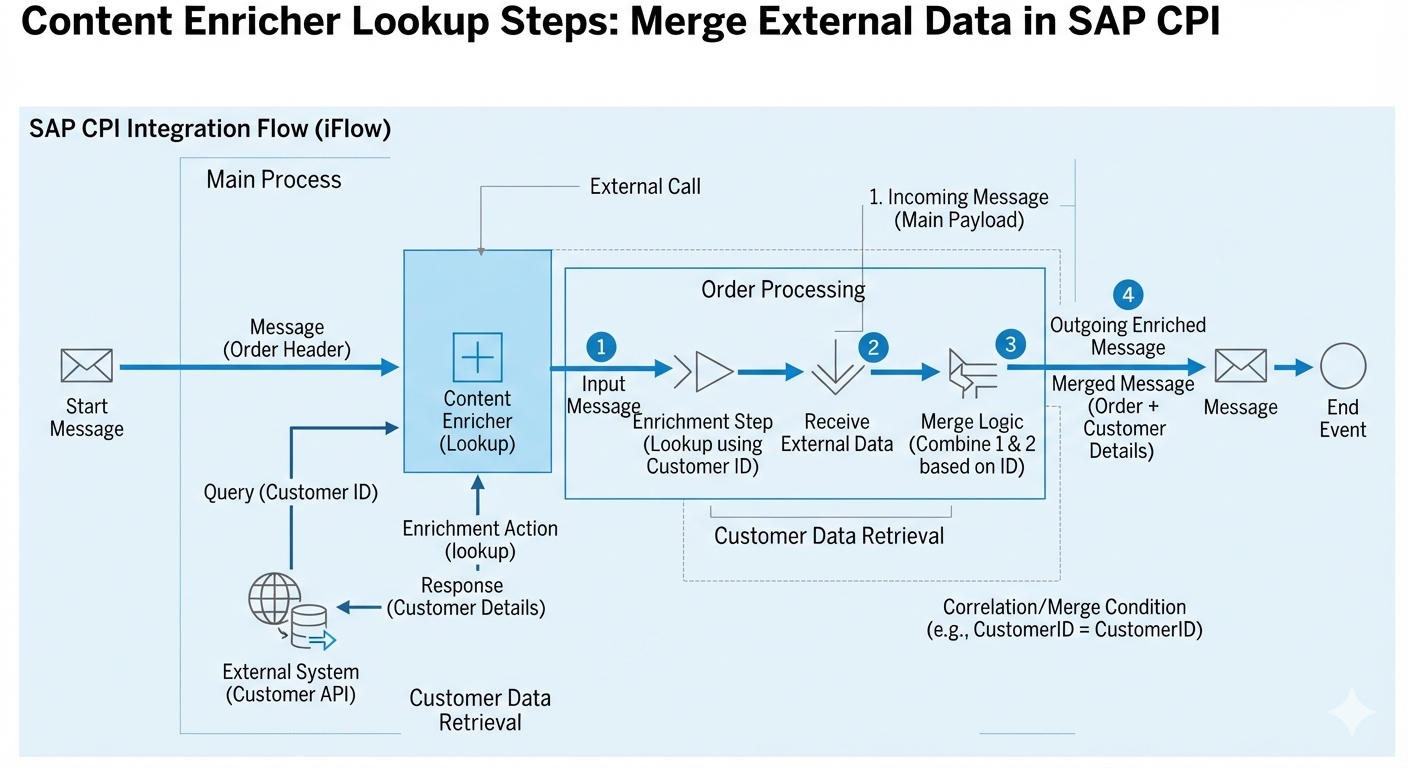
The basic flow looks like this:
Original Message → Lookup Request → External Data → Merge → Final Message
The important part is the merge. SAP CPI must know how the original data and lookup response should come together.
How the Lookup Process Works
A Content Enricher usually works with two message paths.
Part | Purpose |
|---|---|
Original message | Carries the main business data |
Lookup message | Retrieves additional information |
For example, suppose the incoming XML contains:
<Order>
<OrderID>50045</OrderID>
<CustomerID>C1008</CustomerID>
</Order>
The enrichment process can use CustomerID to query an external customer service.
The response might look like:
<Customer>
<CustomerID>C1008</CustomerID>
<CreditStatus>Approved</CreditStatus>
</Customer>
The Content Enricher can then combine these details. Final message often contains both order and credit information.
The lookup system does not need to return the entire business message. It only needs to offer the missing information.
Understanding Lookup Steps
The lookup side of the Content Enricher includes the logic needed to retrieve external data. Based on the integration, this can involve:
an HTTP call
OData service
SOAP service
another supported connection
A typical lookup process involves:
Reading value from the original message.
Creating lookup request.
Calling external system.
Collecting response.
Returning the response for enrichment.
Combining response with the original message.
Suppose an e-commerce company receives an order from SAP. The order contains a product code. Pricing information comes from a separate pricing application.
The lookup can send the product code to that application. The response might contain the current price and discount. SAP CPI then adds those values to the order message. An SAP CPI Training in Hyderabad can help beginners build practical skills in Content Enricher lookup and message processing.
Choosing the Right Merge Strategy
The merge strategy matters because different business cases require different output structures.
Requirement | Suitable approach |
|---|---|
Add a few returned fields | Simple enrichment |
Combine structured XML data | XML-based merge |
Match records using a key | Key-based mapping or transformation |
Create a completely new structure | Mapping after enrichment |
In practice, I have seen integration issues caused not by the lookup itself, but by an incorrect merge design. The external call works perfectly. The problem appears when its response is placed into the original message. Before building the flow, decide exactly where the returned information should appear.
A Practical SAP CPI Example
Consider a company processing purchase orders.
The source system sends:
Purchase order number
Vendor ID
Material number
Quantity
The company also needs the vendor's delivery rating. That rating exists in an external supplier management application.
The Content Enricher can use the Vendor ID for a lookup. The external application returns the delivery rating.
The final message could then contain:
PO Number: 45000125
Vendor ID: V2045
Material: MAT100
Quantity: 50
Delivery Rating: Excellent
This approach keeps the source message simple. It also avoids storing duplicate information in the source application.
Common Problems to Watch For
Content Enricher is straightforward once the message flow is clear. Still, a few issues appear regularly.
Wrong lookup value: External request uses wrong field from the original payload.
Unexpected response: External system returns empty result or error message.
Incorrect merge: Lookup response overwrites information instead of being added to it.
Missing namespace handling: XML namespaces cause unexpected behaviour in mapping or XPath expressions.
Slow external systems: Every lookup adds processing time. A high-volume interface might become slow if it performs unnecessary calls.
When working with large integrations, users must consider using caching or batching. The SAP TM Course is best suited for those planning to learn SAP CPI.
Conclusion
Content Enricher is especially useful when an SAP CPI integration needs information that belongs to another system. The real value comes from combining the lookup response with the original message in a controlled way. SAP BTP Course helps learners understand these integration concepts and practical techniques. Start by identifying the missing data, choose the right lookup method, and plan the final message structure before configuring the flow. That simple approach prevents many integration problems later.