Outlook stores its email data in PST files, whereas most other email applications use the MBOX format for mailbox storage. This guide explains the key factors, approaches and steps involved in converting Outlook PST files to MBOX format or need to access archived Outlook emails in an MBOX-supported email client.
MBOX is used by many email programs like Thunderbird and Apple Mail. It is a helpful utility when you change email platforms, when you move from Windows to Mac, or when you need to access Outlook email data through applications that do not directly support PST files.
However, converting PST to MBOX is not as simple as changing the file extension. A successful migration should retain email content, attachments, folders, metadata, and other important mailbox information. This manual will assist you in learning the key factors, approaches and steps in converting Outlook PST files to MBOX format.
What Is PST to MBOX Conversion?
PST to MBOX conversion is the process of extracting the email data from an Outlook PST file and converting it to the MBOX format. PST is primarily used with Microsoft Outlook, whereas MBOX is supported by various email clients and platforms.
Users might need this conversion when they:
· Switch from Outlook to Thunderbird.
· Transfer Outlook email to Apple Mail.
· Switch from Windows to Mac OS.
· Archive Outlook messages to a more universally supported format.
· Import the PST email data into an MBOX-compatible application.
· Migrate multiple Outlook archives as part of an organizational migration.
The conversion can be done on the whole PST file or on selected folders and emails depending on the method used.
Why Do Users Convert PST to MBOX?
Email client compatibility is one of the major reasons of converting PST to MBOX. Outlook works very closely with PST, while MBOX has wider support across different email applications. TrustVare PST to MBOX Converter lists Thunderbird, Apple Mail, Eudora, Entourage, Opera Mail, Spicebird, and other MBOX-supported applications as target locations for migration.
Another frequent cause is a change of operating system. For example, a person who is switching from Outlook on Windows to a Mac might want to access their old messages using Apple Mail. This transition can be made easier by converting the Outlook archive to the MBOX-based mailbox storage that Apple Mail uses.
Businesses may also need PST to MBOX conversion when they need to consolidate email archives or import historical messages into an application that does not support direct import from PST files.
Essential Data to Preserve During Conversion
A mailbox contains a lot more than just plain email text. Before choosing a method for conversion, users should decide what information must be accessible after migration.
Important ingredients are:
· Details of the sender and receiver
· CC, BCC and To fields
· Email subject lines
· Dates sent and received
· Email body and format
· Enclosures
· Folder and subfolder structure
· Hyperlinks
· Other related email meta data
Its product documentation states that their PST to MBOX converter preserves the email metadata, formatting, attachments, and folder/subfolder hierarchy during conversion.
These elements should be checked after conversion for business or important personal archives; do not assume that every message has transferred correctly.
Manual Method
The manual method might be feasible, if only a few emails need to be moved. Users can use Outlook and an MBOX-supported email client to transfer data for limited amount.
But in the case of the following, manual methods are becoming increasingly inconvenient:
· Large PST files
· Multiple PSTs
· Thousands of emails
· A large number of folders and subfolders
· Mailboxes with a lot of attachments
· Multiple migration activities
The manual processing also increases the amount of repetitive work and makes it harder to confirm that all required messages have been transferred.
Software-Based Solution
For larger migration projects, a dedicated converter might be a more practical option. TrustVare PST to MBOX Converter allows you to convert single or multiple PST files, select specific files for conversion, preview the mailbox data and save the converted MBOX data at a user-defined location. The product page also mentions that the application can run without Microsoft Outlook installed.
Automation can thus reduce repetitive steps and provide a more structured process for managing large archives.
How to Prepare a PST File for Conversion
Preparation is an important part of any mailbox migration. Make a backup copy of the original PST file before you convert the archive. This way you have a copy of the source in case you find missing messages later or other problems.
You also have to:
1. Identify PST files that need conversion.
2. Make sure the files open correctly.
3. If appropriate, delete unnecessary duplicates.
4. Flag important folders and messages.
5. Verify the available storage for the MBOX output.
6. Choose whether to convert the entire archive or specific data.
7. Retain original PST files until migration is validated.
If there are many PST files then you can organize them before conversion so that MBOX data will be easy to manage.
How to Convert PST into MBOX
The exact steps will vary depending on the software you use, but the general process is straightforward.
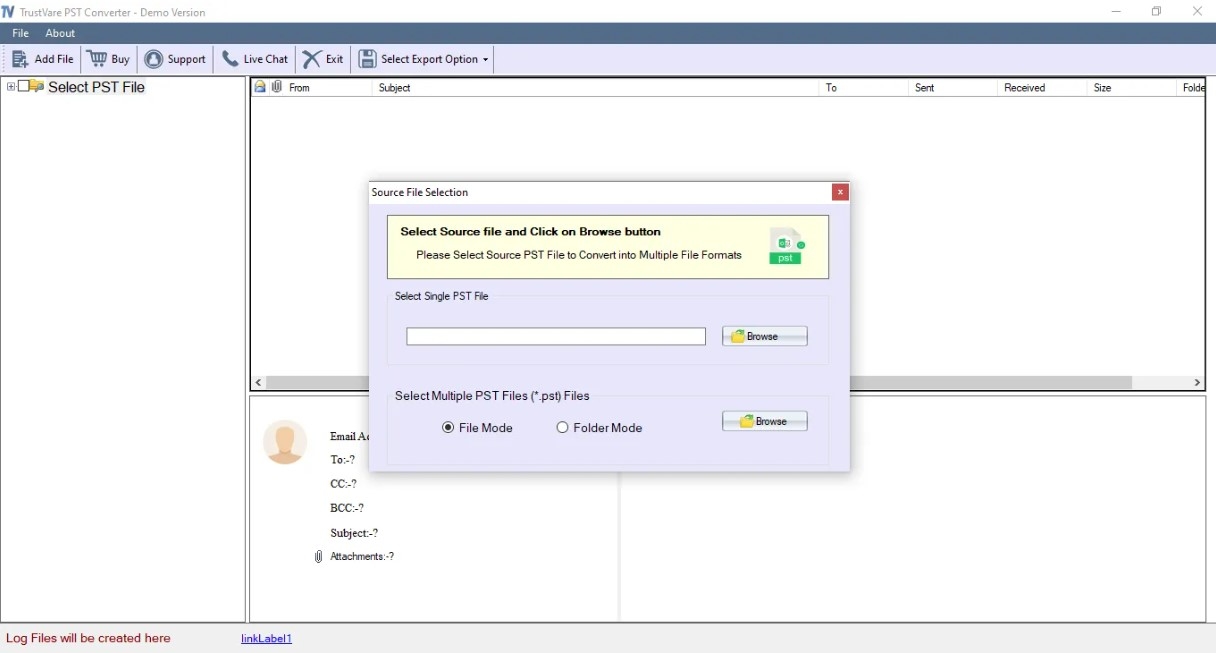
Step 1: Adding PST Files
Launch the conversion tool and import the desired PST file(s). If the application supports batch processing, it can load multiple PST archives at the same time.
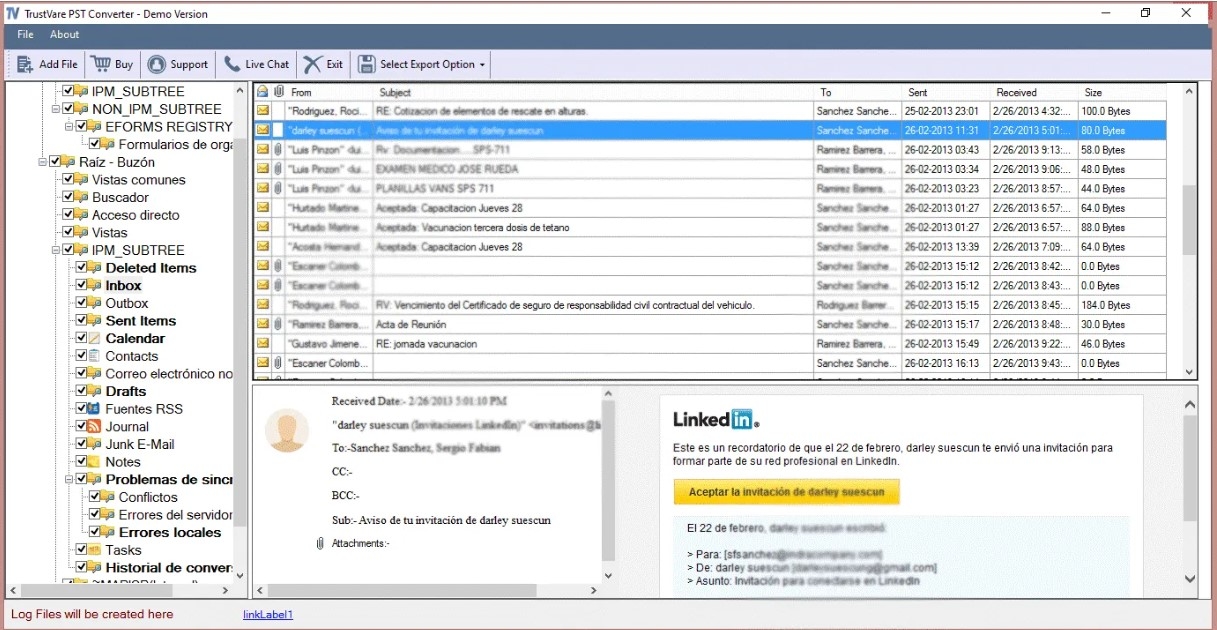
Step 2: View Mailbox
Check the folders and email items shown by the software. The preview function helps you to ensure the right PST is selected before the conversion begins.
Step 3: Choose Required Data
If you don’t require the entire mailbox, select only the folders or messages you need. Selective conversion can cut down on unnecessary processing and make the resulting archive easier to organize.
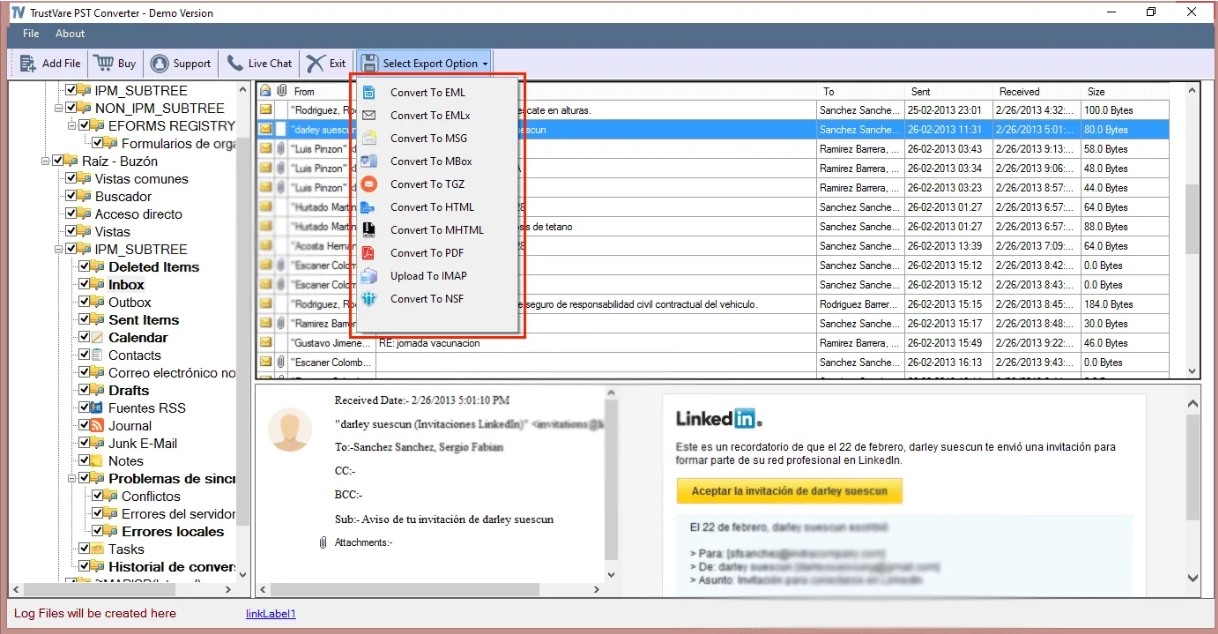
Step 4: Select MBOX as the Output
Choose MBOX as the desired format and the location where you want to save the converted mailbox data.
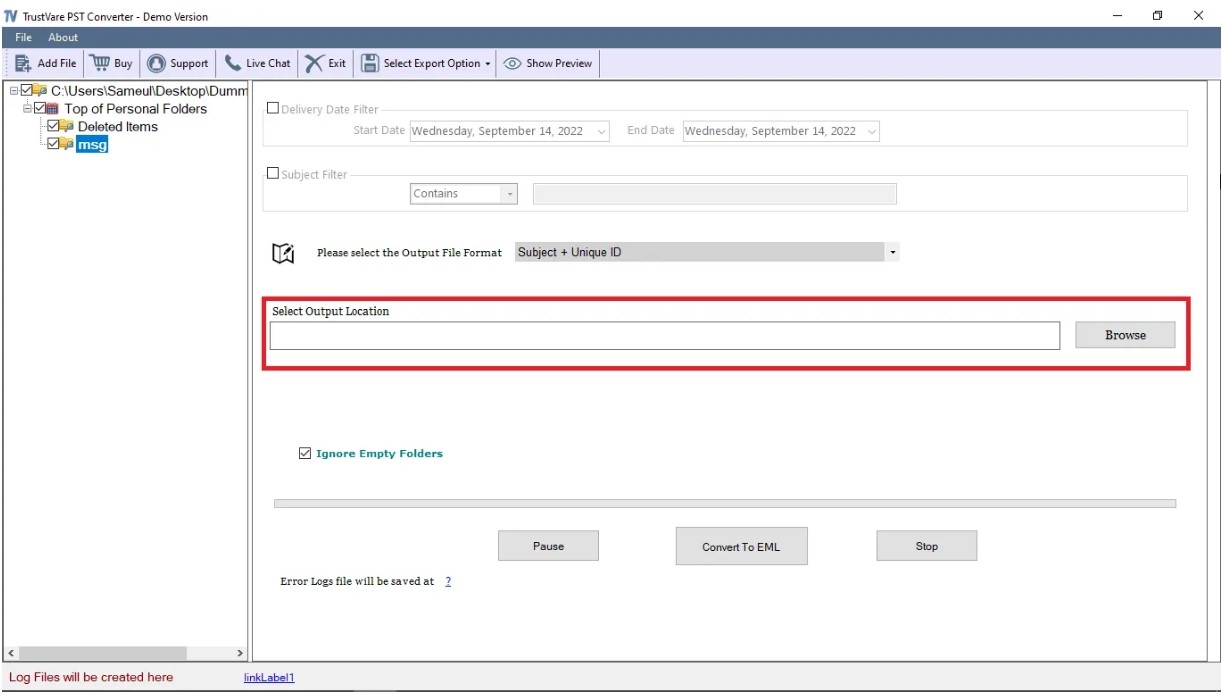
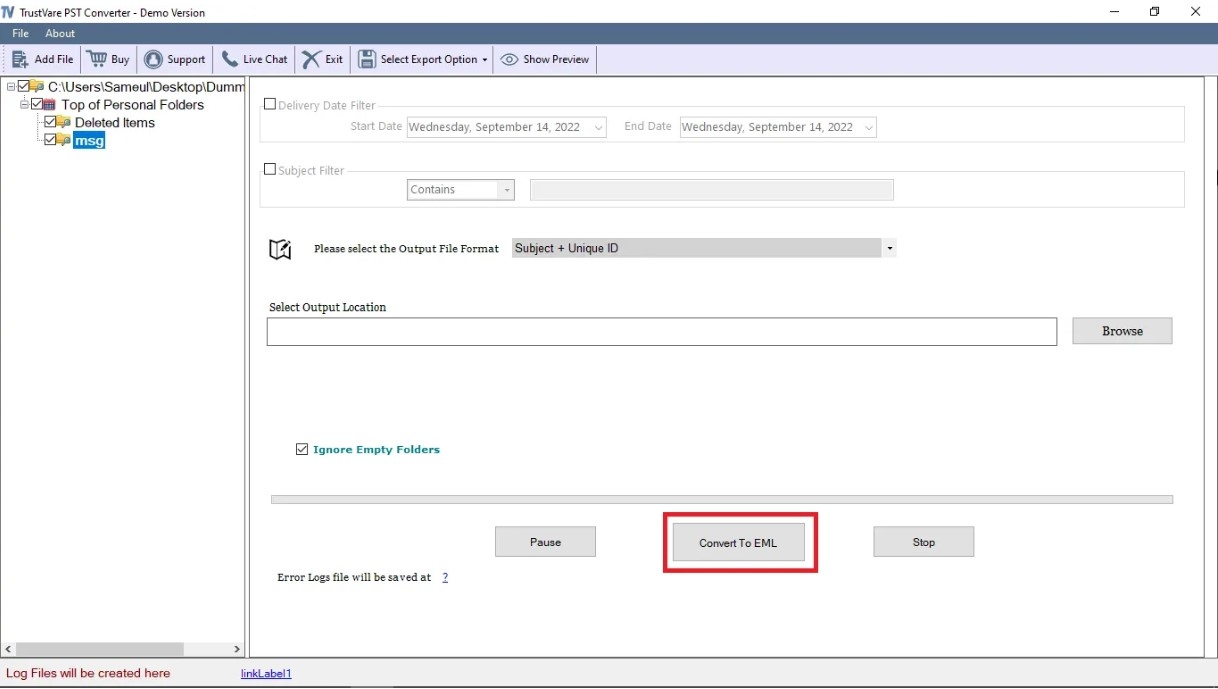
Step 5: Initiate the Conversion
Click on Start Export & wait for the application to process the selected PST data. Some tools also produce a conversion log that can be used to review the operation afterward.
How to Check the Converted MBOX Files
Don’t think migration is finished just because you’ve created MBOX files.
Open the resulting mailbox in the email application of your choice and perform a spot-check on a representative sample of messages. Special attention must be paid to:
· Old and new emails
· Messages with attachments
· Emails featuring pictures
· HTML-formatted messages
· Critical business communication
· Organize folders
· Details from/to
· Dates and topics
In large mailboxes, review messages from various folders, not only the first few emails.
Conclusion
PST to MBOX conversion is especially useful when there is a need to export Outlook email data to an MBOX-supported environment. It can help with migration to applications like Thunderbird and Apple Mail, operating system transitions, and long-term access to email.
A reliable conversion process always involves PST backup, mailbox inspection, selective data handling as required, conversion, and post-conversion verification. By following these instructions, you can significantly minimize the chances of an incomplete migration and ensure that your important Outlook email data is still available after moving to MBOX.
FAQs
1. Is there a way to bulk convert multiple PST files to MBOX?
Yes. PST to MBOX Converter allows batch loading of multiple PST files. This can be useful when working with multiple Outlook archives.
2. Can I keep email attachments while converting PST to MBOX?
Yes. The software is designed to convert PST emails including attachments and preserve important email properties such as To, CC, BCC, Dates and other metadata.
3. Do I need to install Microsoft Outlook for PST to MBOX Conversion?
No, the product info states that the converter does not need Microsoft Outlook for PST to MBOX conversion.
4. Can I convert selected emails/folders from PST?
Yes. Users can choose selective conversion options that allow them to convert specific email data rather than the full PST archive.
5. Which email clients can help use the converted MBOX files?
MBOX files can be used with any email application that supports MBOX. It specifically mentions Thunderbird, Apple Mail, Eudora, Entourage, Opera Mail, Spicebird and other supported clients.