Overview
One of the most difficult tasks facing organizations is moving email to a new platform. Company data such as customer communications, contracts, project discussions, invoices and compliance records can often be years worth of vital email data. Data loss during migration could lead to operational disruptions, legal problems and loss of productivity.
In this case study, we’ll show how a mid-sized organization successfully migrated over 50,000 Outlook emails to an MBOX supported email environment without losing a single email, attachment or folder structure. The migration was accomplished using a structured migration strategy and a professional PST to MBOX converter solution.
Client Background: Modernizing a Decade of Outlook Data
The client was a growing consulting firm, with 250 employees, distributed across a number of locations. For more than ten years, email had been handled through Microsoft Outlook. In an attempt to modernize, the company decided to phase out Outlook and use an MBOX-supported email client to have better cross-platform access.
The organization had multiple PST archives that contained historical emails from various departments, including:
Marketing and Sales, Human Resources, Financials, Customer Service, Managing Projects
The total volume of the emails was more than 50,000 messages in several PST files.
The Challenge: Overcoming Enterprise Email Migration Roadblocks
Before migrating, the company had to face a number of challenges:
Email data with high volume: There was no practical way to manually migrate over 50,000 emails. The IT team wanted a solution that could work effectively with large PST files.
Data Loss Risk: Many of the emails contained business critical information and attachments. Even a small loss of data could cause problems with compliance and operations.
Preserving Folder Structure: The organization had, over the years, carefully organized mailbox folders. The original hierarchy was critical for post-migration user adoption.
Decreased Downtime: The company wanted the migration done fast without interrupting day-to-day operations of the business.
Integrity of metadata: Email headers, timestamps, sender information, recipient details and attachments had to remain unchanged during the migration process.
Hence, manual migration approaches were not suitable for these requirements.
Why Manual PST to MBOX Conversion Fell Short
First of all, the IT team checked for the manual ways to convert PST to MBOX. They tried drag-and-drop procedures and free utilities on the web.
But a number of problems arose quickly:
· Too long processing time
· Limited support for big PST files
·Discrepant findings
· High risk of missing e-mails
· Folder hierarchy disruptions
· More administrative tasks
With these limitations in mind, the team decided that a professional migration solution would be required.
Choosing the Right PST to MBOX Converter
After exploring the solutions available, the company chose GainTools PST to MBOX Converter for the migration. This software was chosen because it can convert PST files accurately and preserve the mailbox structure, email properties and attachments. The tool is specially designed to export Outlook PST data to MBOX format with the integrity of email content and preview options before conversion.
Key Criteria for Selecting the Migration Tool
The decision was based on a number of factors:
· Easy-to-use interface
· Outlook PST files support
· Structure of folders preserved
· Attachments migrate accurately
· Preview function
· Flexible destination choice
· Reproducible conversion performance
These features were well aligned to the organization’s migration goals.
Step-by-Step PST to MBOX Migration Process
The approach used to complete the migration project was:
Step 1: Installing the software
The conversion software was loaded into a dedicated migration workstation.
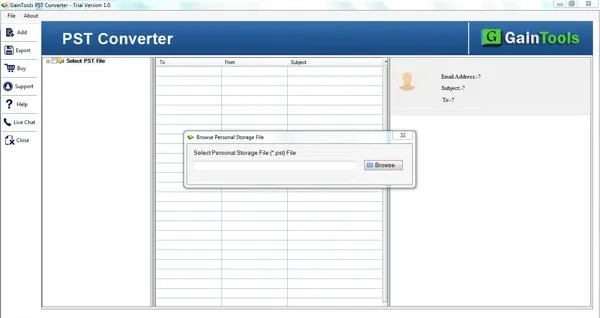
Step 2: Load the PST File
The necessary PST files were added to the application and scanned for processing.
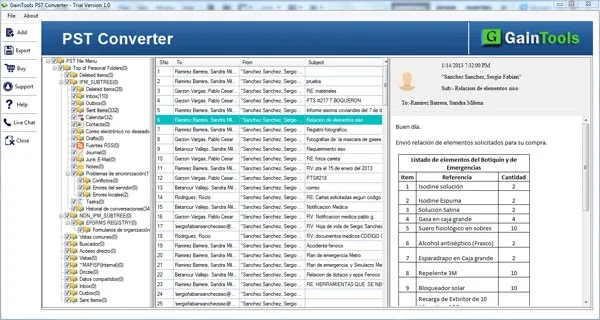
Step 3: Data Validation
With preview, the IT team was able to review folder and email content before conversion began. The preview feature allows users to preview mailbox contents before exporting.
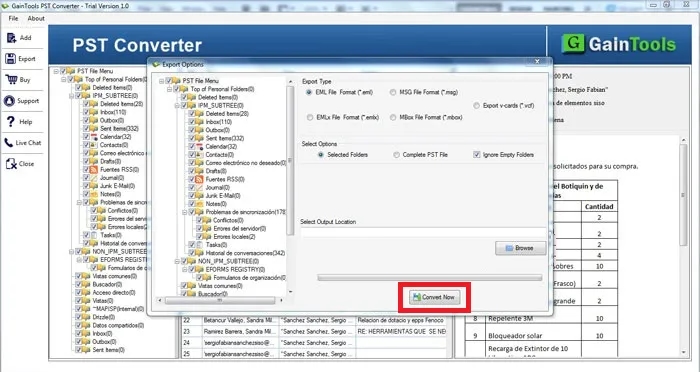
Step 4: Convert to MBOX
The PST files are converted to MBOX format and saved to the desired location.
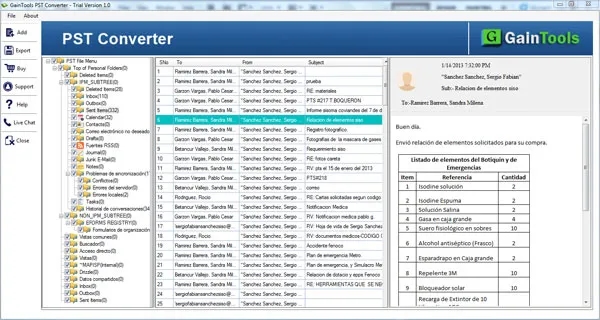
Step 5: Testing and Validation
The MBOX files were converted and imported to the new email environment and extensively tested.
Results: Flawless Execution and Zero Data Loss
The migration project achieved highly successful outcomes.
50,000+ Emails Migrated Successfully: All email messages have been converted and moved successfully.
Zero Data Loss: During validation, the organization reported no missing emails, corrupted messages or lost attachments.
Retained folder structure: The original hierarchy of the mailbox was preserved, so it was easy for employees to locate the information after the migration.
Preservation of Metadata Integrity: Important properties of the email such as:
· Sender information
· Recipient’s particulars
· Date and time stamps
· Subject
Attachments were retained in migration. The software maintains the structure of the email content and metadata during export operations.
Less administrative work: The IT team was able to do the migration in a fraction of the time it would have taken manually.
Improved Access: MBOX allowed employees to access historical email data in their new email platform without Outlook.
Long-Term Business Impact & ROI
The successful migration resulted in a few long-term benefits.
Better Cross-Platform Compatibility: The organization had ceased its retrieval of archived email data from Microsoft Outlook.
Better Control of Email: The MBOX files were easily incorporated into the company’s new email environment.
Less Operational Complexity: The IT department reduced ongoing management requirements for PST-based archives.
Improved User Satisfaction: The mailbox structures and the content of the e-mails were identical, making the switchover easy for employees.
Key Takeaways & Best Practices for Email Migrations
This migration project demonstrated several best practices for organizations considering PST-to-MBOX conversion projects:
· Backup before you migrate.
· Test a sample conversion before processing large data sets.
· Validate the converted data.
· Try to preserve folder hierarchy as much as possible.
· Use professional tools for large migrations.
· Don’t depend on manual techniques for enterprise email volumes.
Conclusion
Migrating business email archives is an important process that needs precision, planning and trusted technology. In this real-world project, a consulting firm has migrated more than 50,000 Outlook emails to an MBOX-based environment without any data loss, attachment issues or folder structure changes.
The organization minimized risk, accelerated migration times and enhanced long-term access to email by selecting the appropriate migration approach and deploying a professional conversion solution. This case highlights the need for seamless and efficient PST to MBOX migration for organizations managing extensive Outlook archives, safeguarding the integrity of vital communication records.
Frequently Asked Questions
How to convert large PST files to MBOX without installing Microsoft Outlook?
Yes. PST to MBOX Converter is a professional automated tool which works on its own, this means you do not need to have Outlook installed on your system to export the PST file.
Will PST to MBOX conversion affect or alter my folder structure?
No. Advanced conversion tools are designed to retain your original folder structure, including all subfolders, labels and directory paths during the migration.
Does the conversion of PST to MBOX save attachments from email?
Yes. All associated attachments (documents, images, archives) are securely converted along with the parent email messages without any corruption or data loss.
Can I take a look at emails before performing the final migration?
Yes. Most professional utility software comes with an inbuilt scan and preview feature that allows IT administrators to view the contents of mailbox folders and confirm the email content before exporting.
Why are drag & drop manual methods not sufficient for large business mailboxes?
Manual processing is too slow, prone to data corruption, unable to batch process and often corrupts complex folder hierarchies when thousands of records are involved.
Which email clients have built-in support for MBOX format?
MBOX is an open standard and is supported by several popular email clients such as Mozilla Thunderbird, Apple Mail, SeaMonkey and Eudora.



