Introduction
Modern IT departments and enterprise environments rely on the ability to manage email infrastructure, execute system upgrades, and maintain accessible data archives. The transition from open desktop email clients to Microsoft enterprise environments such as MS Outlook or Exchange Server can be a daunting technical challenge, especially when you need to extract individual email messages for legal discovery or modular archiving.
Organisations that use open-format email applications such as Mozilla Thunderbird, Apple Mail, or Google Takeout backup repositories often encounter integration barriers when moving data into Microsoft Outlook. MBOX file is a collection of mail folders in a single file, so you cannot open individual message objects in Outlook without specialised software, like the Softaken MBOX to MSG Converter. This tool helps IT admins and end users to easily and securely transfer MBOX mailbox data to individual .msg files.
File Format Understanding
To understand why you need specialised conversion tools, it helps to look at the structure and roles of the underlying file formats:
• MBOX (Mailbox): An open and universal file format that is supported by many operating systems and email applications. MBOX files are a collection of email messages concatenated into a single text file. This means popular clients such as Mozilla Thunderbird, Apple Mail, SeaMonkey, Entourage, and Opera Mail natively support them.
• MSG (Outlook Mail Message): A proprietary single-message file format used by Microsoft Outlook and Exchange Server. An MSG file is a single, stand-alone email item containing the message body, header information, attachments, and hyperlinks. You can save emails as MSG files so users can individually manage, scan, drag-and-drop, and archive messages separately within Windows and Outlook.
Manual Method and Software Solution
The Manual Way
Manual MBOX to MSG migration without using specialised software usually requires multiple-step workarounds:
1. Using third-party add-ons to import MBOX files into an intermediate email client (like Mozilla Thunderbird).
2. Running Microsoft Outlook and Thunderbird on the same desktop or configuring an IMAP account.
3. Drag and drop the selected emails manually from the open MBOX mail folders to a local Windows directory or Outlook folder to create individual .msg files.
Downsides of manual workarounds:
These manual routines are labour-intensive, time-consuming, time consuming and highly prone to human error or file corruption. Critical metadata attributes such as To, From, CC, BCC, hyperlinks, non-English double-byte characters, timestamps, etc. are often altered or lost. Also, inline images often don't work, attachments get lost, and processing thousands of messages individually is just inefficient and dangerous.
The Software Solution
Specialised tools such as Softaken MBOX to MSG Converter take care of the entire migration process automatically. The application directly opens source MBOX files, extracts all individual email parts, and converts them into standard, fully compliant MSG files.
Benefits of Automation:
• Maintains clean folder structures and directory trees.
• Retains email header properties, inline images, and rich text formatting.
• Attachments are extracted and embedded unchanged.
• Converts large MBOX Files into hundreds and thousands of MSG files in a fraction of the time.
My experience
Our department is part of an IT infrastructure management team that regularly manages workstation modernisation, platform migrations, and compliance archiving projects. In a recent enterprise-wide data migration, we were asked to convert large archived MBOX repositories (from Thunderbird and Google Takeout) into individual MSG files to feed an automated compliance indexing engine for Microsoft Outlook users.
With tight deadlines, high email volumes, and strict Data Loss Prevention protocols, manual drag-and-drop procedures were not an option. For ease of our workflow, we picked and installed the Softaken MBOX to MSG Converter.
The application handled large-scale MBOX repositories without any slowdown or system crash. It correctly maintained all Internet header attributes, fluently mapped non-English character sets, and maintained all attachments correctly linked with their respective MSG files. The utility automated the conversion, which would have otherwise taken weeks of manual effort, providing a secure, compliant, and error-free conversion across our organisation.
What we like about this software
• 100% Data Integrity: No data loss or modification, exact header properties (To, From, CC, BCC, Date), embedded attachments, and double-byte character sets (such as Chinese and Japanese characters).
• Batch Processing Engine: File and Folder modes for selection are provided to enable users to select and convert multiple MBOX files at once – perfect for large-scale enterprise deployments.
• Built-in Preview Data: Provides a clear and organised preview pane of loaded MBOX files before conversion. This allows administrators to view the mailbox contents and email details before conversion.
• Target Directory Selection: Users will have complete liberty to select any specific local drive/network share or new folder as the output path to save MSG files.
• Lightweight & High Compatibility: It uses very few system resources, but works just fine with all major versions of Windows OS (Windows 11, 10, 8.1, 8, 7 and Windows Server editions included).
How to Use This Software
1. Download & Installation: Download and Install Softaken MBOX to MSG Converter on a Windows PC.
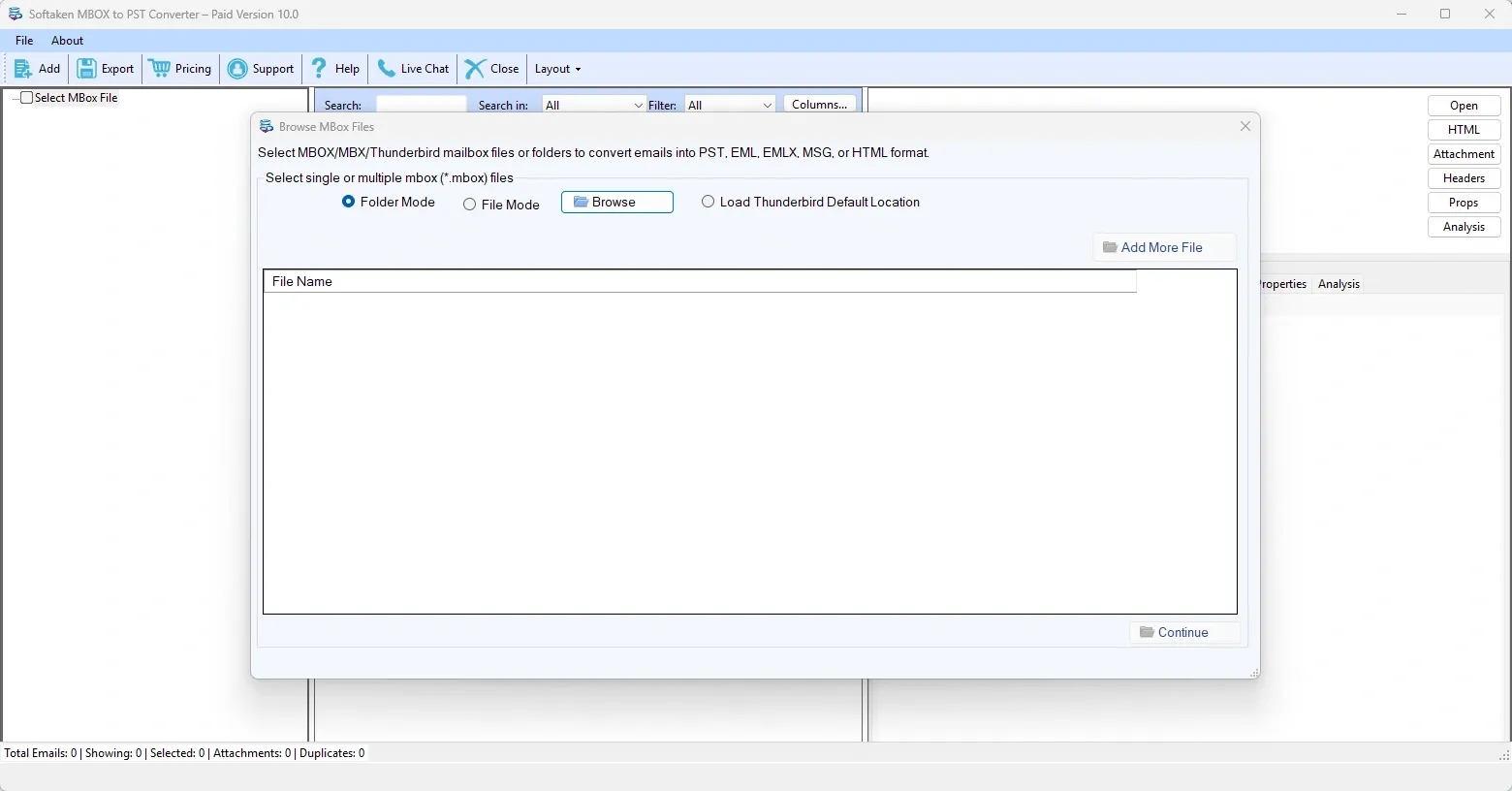
2. Import MBOX Files: Open the application and select either Select File or Select Folder mode to import single or multiple MBOX files to the interface.
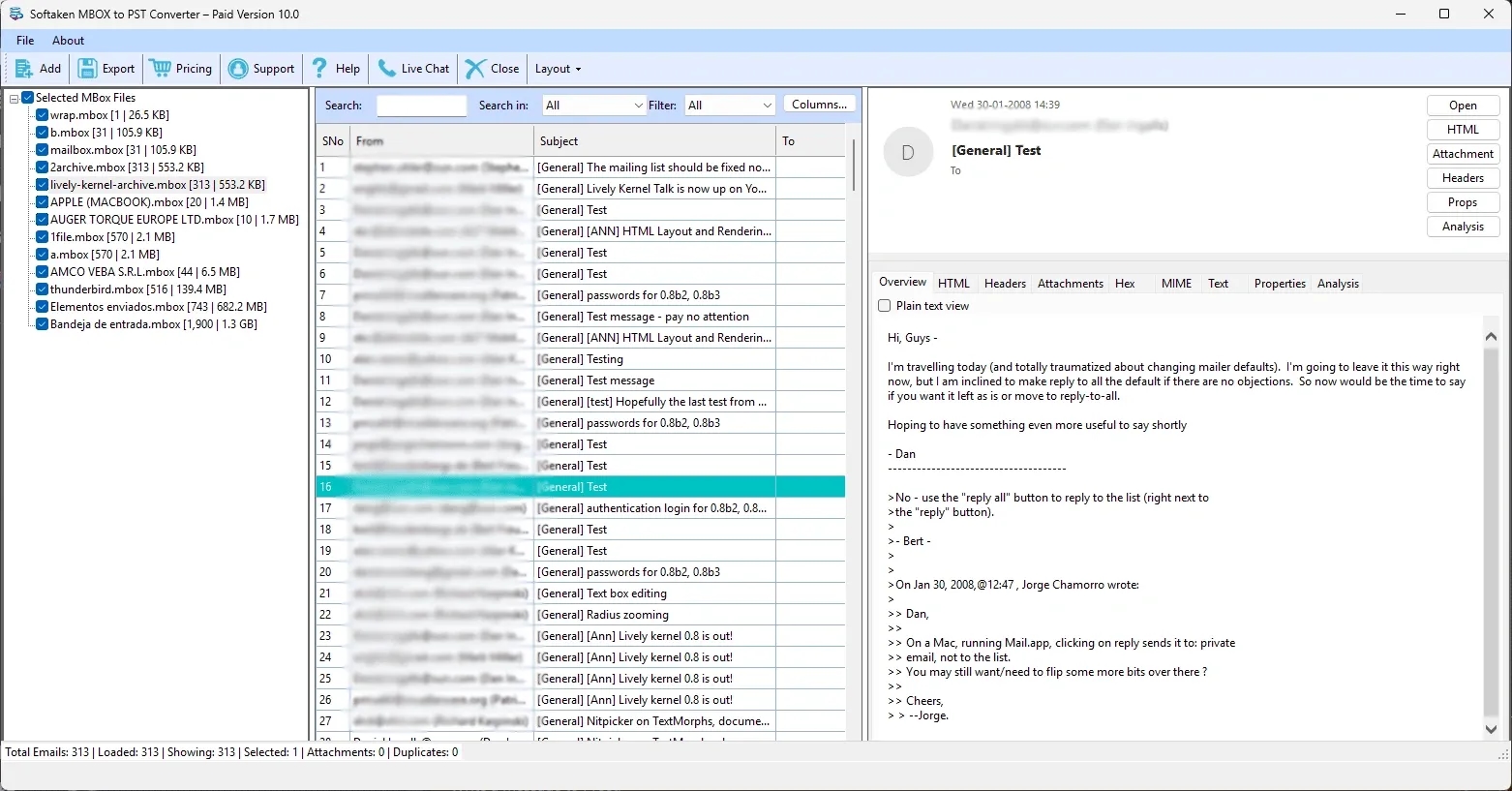
3. Preview Mailbox Data: Explore the automatically generated structure in the preview pane to view individual email messages and attachments.
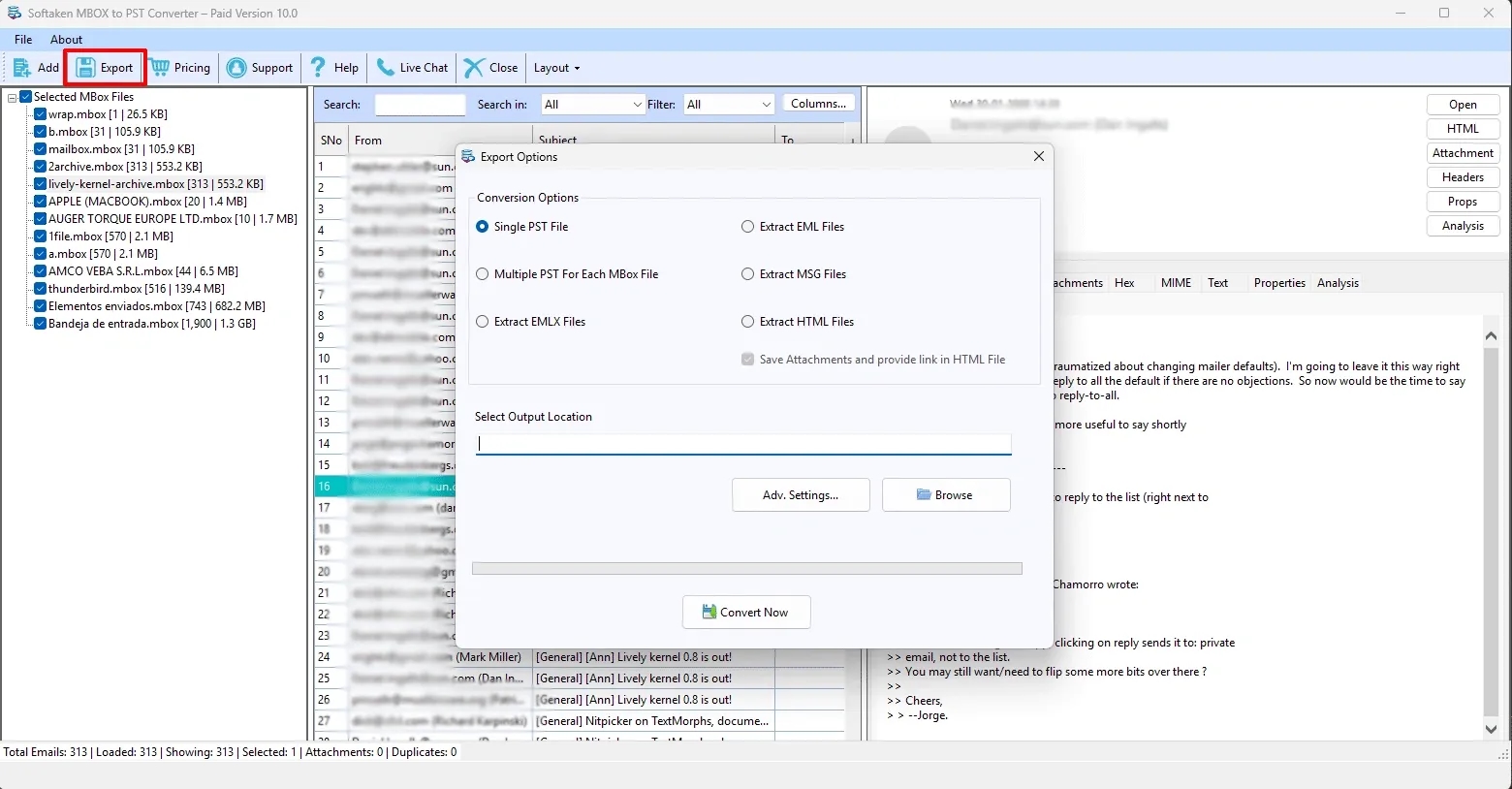
4. Select Output Option: Select the output file format as MSG.
5. Convert Now: Hit the Convert Now button to initiate the batch extraction and transformation procedure.
Pros and Cons of Software
Pros
• Clean & Intuitive Interface: User-friendly UI for non-technical users as well as experienced sys-admins.
• High-Speed Batch Engine: It processes efficiently and can handle large MBOX files without any risk of performance lag or crash.
• Full Metadata Preservation: All email headers, folder context, inline images, attachments, and special character sets.
• Independent Operation: It doesn't require Microsoft Outlook to be actively configured or installed to be able to do the conversion.
• Free Demo Version: Trial version to convert up to 10 items per folder to try the product before buying.
Cons:
• Windows-Only Software: Built only for Windows OS, no native support for macOS.
• Corrupted File Limitation: Physical corruption in MBOX files can be serious and may require repair before conversion.
Licensing Opportunities:
Softaken has flexible licensing models to suit the various requirements of the users:
• Personal License: For individuals who want to convert mailboxes on two personal computers.
• Business License: Best suited for small to mid-sized organisations with multiple administrative workstations utilising the tool.
• Enterprise License: Provides full operational coverage for large organisations, data centers and IT service teams requiring unlimited use across multiple office locations.
Conclusion
Softaken MBOX to MSG Converter is a reliable, fast, and accurate tool for system administrators, enterprise IT teams, and individual users to convert MBOX files to separate Microsoft Outlook MSG messages. MBOX to MSG migration offers a safe, easy migration, free of risks of metadata loss, formatting errors, and long operational downtime that manual workarounds are often associated with.
FAQs (Frequently Asked Questions)
1. Is Microsoft Outlook required on the machine during the conversion?
No, Softaken MBOX to MSG Converter is a standalone utility, and it does not require Microsoft Outlook to be installed or configured on the host system to process files.
2. Does the tool save email attachments and inline images?
Yes, all embedded attachments, inline images, hyperlinks, and rich-text formatting details are extracted in full and preserved within the resulting MSG files.
3. Are there any limitations on file size to convert large MBOX files?
No, the tool supports any size of MBOX file. There are no limitations on file size and no performance degradation.
4. Can I process multiple MBOX files together?
Yes, Softaken MBOX to MSG Converter offers a bulk Folder Mode to choose and convert multiple MBOX files in an automated mode.




