Introduction
The key tasks for modern IT departments and enterprise environments are the management of email infrastructure, system upgrades, and access to data archives. One of the technical challenges in transitioning from IBM Lotus Notes / HCL Domino environments to Microsoft enterprise ecosystems such as MS Outlook or Exchange Server is the extraction of individual email messages for purposes of legal discovery, compliance auditing, or modular archiving.
These integration challenges are common for companies migrating away from Lotus Notes and trying to import proprietary database files (.nsf) into Microsoft Outlook environments. Lotus Notes stores mailboxes in its own NSF databases. This means that these files cannot be opened in Outlook as native single-message objects, but they can be opened in Outlook using special software. To resolve this issue, TrustVare NSF to MSG Converter helps IT administrators and individual users to smoothly and securely export Lotus Notes NSF mailbox data into individual MSG files.
File Format Basics
To understand why we need special conversion software,e it is useful to look at the structural differences of the underlying file formats:
• NSF (Notes Storage Facility): A proprietary database file format used by IBM Lotus Notes and HCL Domino servers. NSF files are not just for mail, but can store collaborative data such as messages, calendar entries, contacts, design elements, and embedded attachments in a well-organised database schema.
• MSG (Outlook Mail Message): Microsoft proprietary single message file format for Outlook and Exchange Server. An MSG file is a complete email message that includes the body, headers, attachments, and hyperlinks. The MSG format allows users to save emails and process, scan, drag-and-drop, and archive emails individually outside the Windows and Outlook environment.
Manual Method or Software Solution
If you do not have special software to migrate an NSF to MSG, you would usually have to resort to complex multi-step workarounds:
1. Export NSF to Intermediate Format: Lotus Notes mails can be exported to CSV or text files manually or can be configured to forward messages to an intermediate IMAP server.
2. Integration with Outlook: Use the same IMAP account or import the raw data into Microsoft Outlook.
3. Manual extraction: Drag emails from Outlook folders to a Windows folder. This will create separate .msg files.
Disadvantages of Manual Workarounds
Manual routines are slow, tedious, and very prone to human error or file corruption. Important metadata attributes (To, From, CC, BCC, hyperlinks, non-English double-byte character sets, and accurate time stamps) are frequently altered or lost. Also, inline images break, attachments get detached, and processing thousands of messages one by one is inefficient and risky.
The Software Solution
The entire migration process is automated with the help of specialised software like TrustVare NSF to MSG Converter. It opens NSF source files directly, extracting individual email
components and converting them into standard, fully compliant MSG files - no need to set up an intermediate email client.
Automation: The Big Benefits
• Keeps correct folder structures and directory trees.
• Preserves all email header attributes, inline images, and rich text formatting • Extracts and embeds attachments as they were originally
• Converts large NSF repositories to thousands of MSGs at a time
Based on My Experience
As part of an IT infrastructure management team, our department routinely manages workstation modernizations, platform migrations, and compliance archiving projects. During a recent enterprise data migration effort, we were tasked with converting large archived Lotus Notes NSF repositories into individual MSG files to feed into an automated compliance indexing engine for Microsoft Outlook users.
Relying on manual drag-and-drop procedures was out of the question due to tight deadlines, high email volumes, and strict Data Loss Prevention protocols. We selected and deployed the TrustVare NSF to MSG Converter to streamline our workflow.
The application easily processed high-volume NSF repositories without system slowdowns or stability issues. It accurately preserved all Internet header attributes, mapped non-English character sets seamlessly, and kept all attachments properly linked to their respective MSG files. By automating what would have otherwise taken weeks of manual effort, the utility ensured a secure, compliant, and error-free conversion across our organization.
Why I love this software:
• Data Integrity 100%: Guarantees no data loss or data corruption, keeps all header properties (To, From, CC, BCC, Date) and embedded attachments and double-byte character sets (e.g., Chinese or Japanese characters) intact.
• Batch Processing Engine: Offers File and Folder selection modes that enable users to select and convert multiple NSF files at one time, ideal for enterprise-wide, large-scale deployments.
• Built-in Data Preview: It provides a well-arranged preview pane of the loaded NSF files before conversion, through which the admins can view the mailbox content, folder trees, and email details in advance.
• Output Destination Directory Selection: Enables you to select any existing drive, network share, or even any newly created directory as the destination location to store MSG files.
• Low Consumption and High Compatibility: It consumes fewer system resources and supports all versions of the Windows Operating System, including Windows 11, 10, 8.1, 8, 7, and Windows Server.
With this program
1. Download & Install System Requirements for Windows OS
Download and install TrustVare NSF to MSG Converter on your Windows PC host machine.
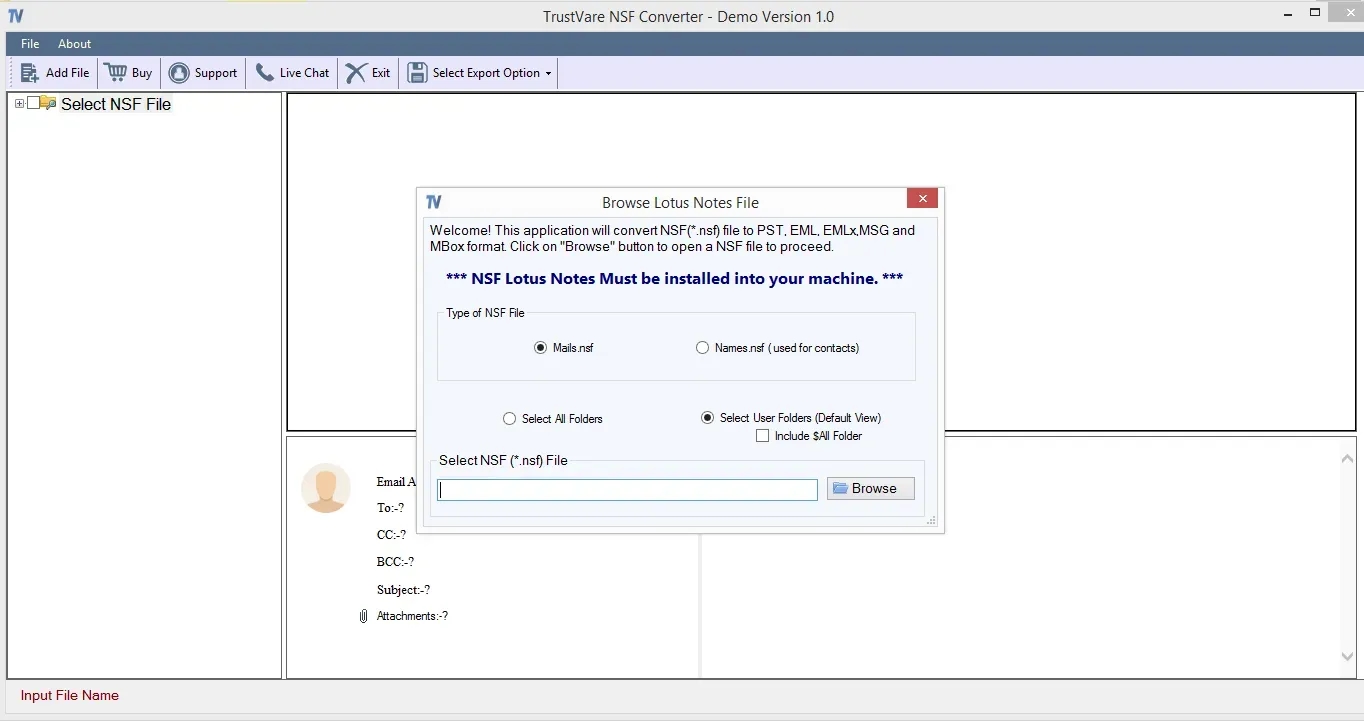
2. Include NSF Files:
Run the tool and choose Select File or Select Folder mode to load single or multiple NSF files to the tool.
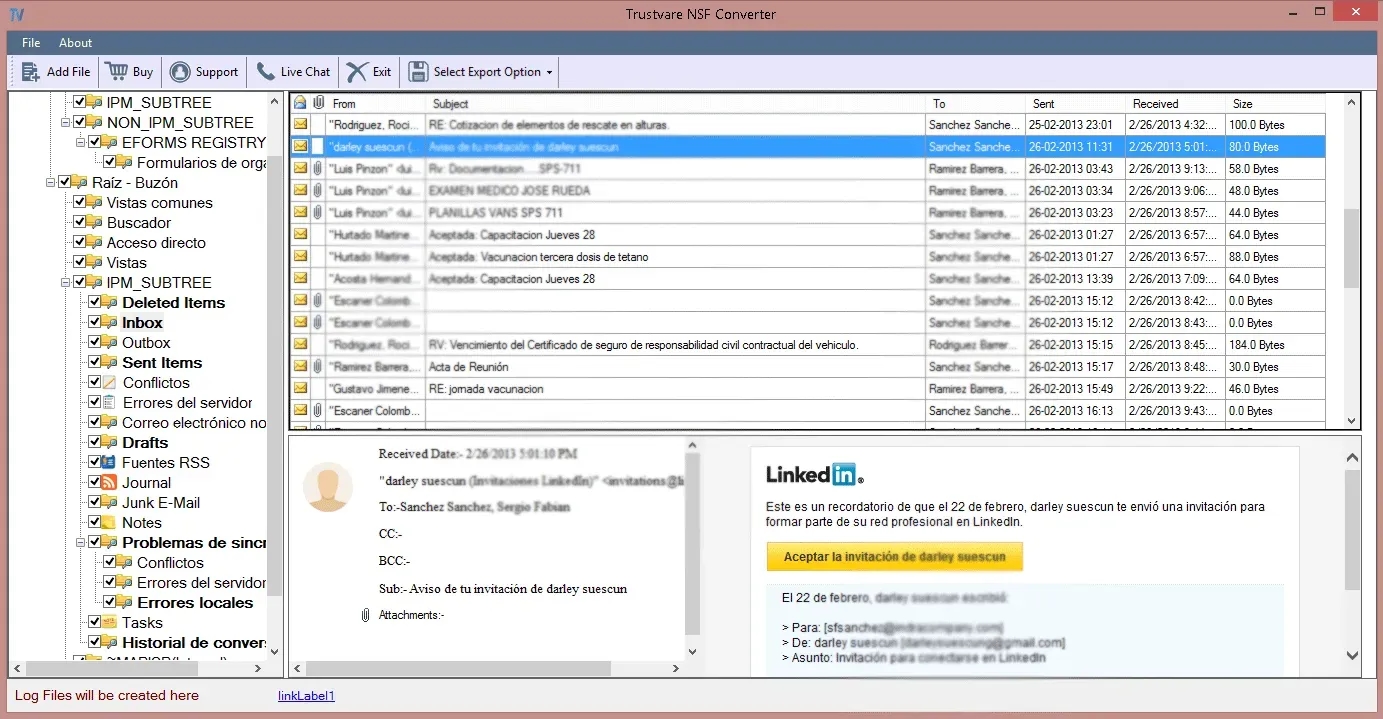
3. Preview Mailbox Items:
Preview pane to view the auto-generated folder tree and individual emails, metadata, and attachments.
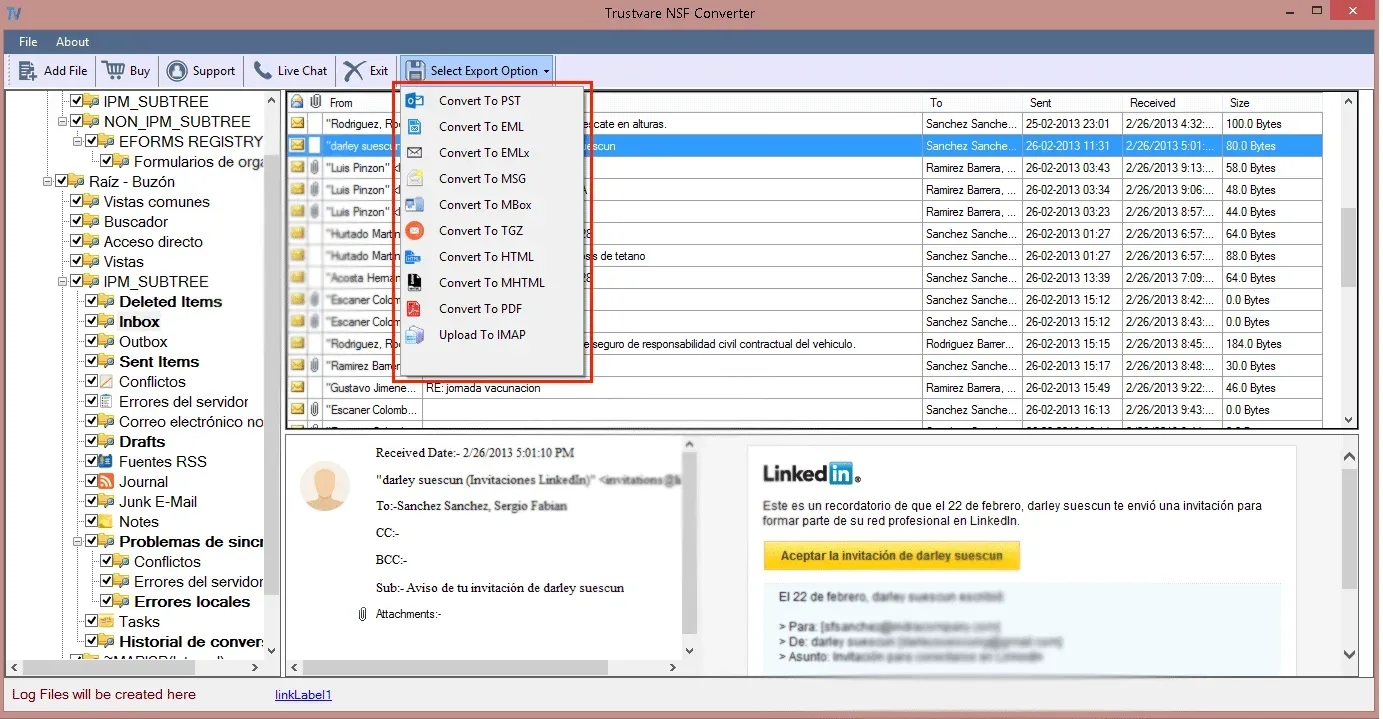
4. Choose Output Option:
Choose the format you want to export to from the options below. “It’s MSG.
5. Select an output location:
Click Browse and select an output path or create a new target folder on your local storage or network drive.
6. Make the Conversion:
Click Convert Now to start batch extraction and transformation.
Software Pros & Cons
Benefits
• Clean & Intuitive Interface: User-friendly UI for non-technical users and experienced system admins alike.
• High-Speed Batch Engine: Process large NSF files instantly and crash-free.
• Full Metadata Preservation: All email headers, folder context, inline graphics, attachments,s and unique character sets are preserved in entirety.
• Standalone Operation: You do not need to have Microsoft Outlook configured/installed to be able to perform the conversion.
• Free Demo Version: A demo version is provided to convert a few items per folder to check the performance before purchase.
Cons
Windows Only: This is only for Windows O, and there is no native support for macOS.
Lotus Notes Prerequisite: To analyze the databases, you need to install the IBM/HCL Lotus Notes client on the machine.
• Corrupt File Constraint: If the NSF files are physically badly damaged, they may need to be repaired before conversion.
Potential for Licensing:
TrustVare provides flexible licensing models for different deployment needs:
• Personal License: For individual users wanting to convert mailboxes on two personal computers
Business License: Best for small to medium organizations who will be running the tool from multiple admin workstations.
• Enterprise License: Unlimited use for large enterprises, data centres and IT service teams with multiple office locations to cover broad operations.
Final Judgment
TrustVare NSF to MSG Converter is the most reliable tool for System Administrators, enterprise IT teams, and individual users who want to convert Lotus Notes NSF Files to individual Microsoft Outlook MSG messages. It takes away the risks of losing metadata, formatting errors, and long operational downtimes related to manual workarounds. NSF to MSG conversion is easy and safe.
FAQs
1. Does the machine require Microsoft Outlook to convert?
No, TrustVare NSF to MSG Converter does not need Microsoft Outlook. You do not have to install or configure Outlook on the host system to access the files.
2. Does the tool retain email attachments and inline images?
Yes, all embedded attachments, inline images, hyperlinks, and rich-text formatting details are extracted completely and preserved inside the generated MSG files.
3. Can a large NSF file affect NSF to EML conversion?
No. The application is capable of processing files of any size. No artificial limits on the size of the NSF file or performance degradation.
4. Is there a way to convert multiple NSF files at the same time?
Yes, the TrustVare NSF to MSG Converter has an option for bulk batch mode in which you can select and convert multiple NSF files in one automated run.