If an Outlook PST file gets corrupted, retrieving email, attachments and folder structure might be a priority. One of the most important things to consider is whether or not a repair tool is going to work with ANSI and Unicode PST files because Outlook uses both file formats over different versions.
The review is based on the practical experience of working through a PST repair scenario including scanning files, recovering, previewing and saving repaired data. The focus is on ANSI and Unicode compliance and not on listing the features of the software.
ANSI and Unicode PST: Why It Matters
The two main formats for Outlook PST files are ANSI and Unicode. ANSI files are linked to older Outlook versions and have a smaller storage limit, whereas Unicode PST files, introduced with Outlook 2003, support larger mailboxes and wider character sets.
This difference matters when you are recovering data from an older office archive. If an organization has PST files that span multiple generations of Outlook, having a repair tool that supports both formats can be handy.
According to the official product information, it supports ANSI and Unicode PST recovery and orphaned PST files.
Metrics
A consulting firm with a 12-year old Outlook archive and want to get a sense of the practical workflow without claiming an unperformed test. The firm has collected approximately 85GB of email in a number of PST files.
The recovery scenario for this review consists of:
· An older 1.8 GB ANSI PST file with historical client correspondence.
· A 9.6 GB Unicode PST with newer project emails and attachments.
· An archive that has been damaged in such a way that Outlook can't open it normally.
· Can recover emails without having to install Microsoft Outlook.
This data is from a simulated test setup and not real measurements. They help show what a reviewer should look for when reviewing ANSI recovery and Unicode recovery.
Step-by-Step Process
The official product page lists supported operating systems as Windows 11, 10, 8.1, 8 and 7. The flow recorded is straightforward:
Download and Install: Download and launch the PST Repair software on your Windows system.
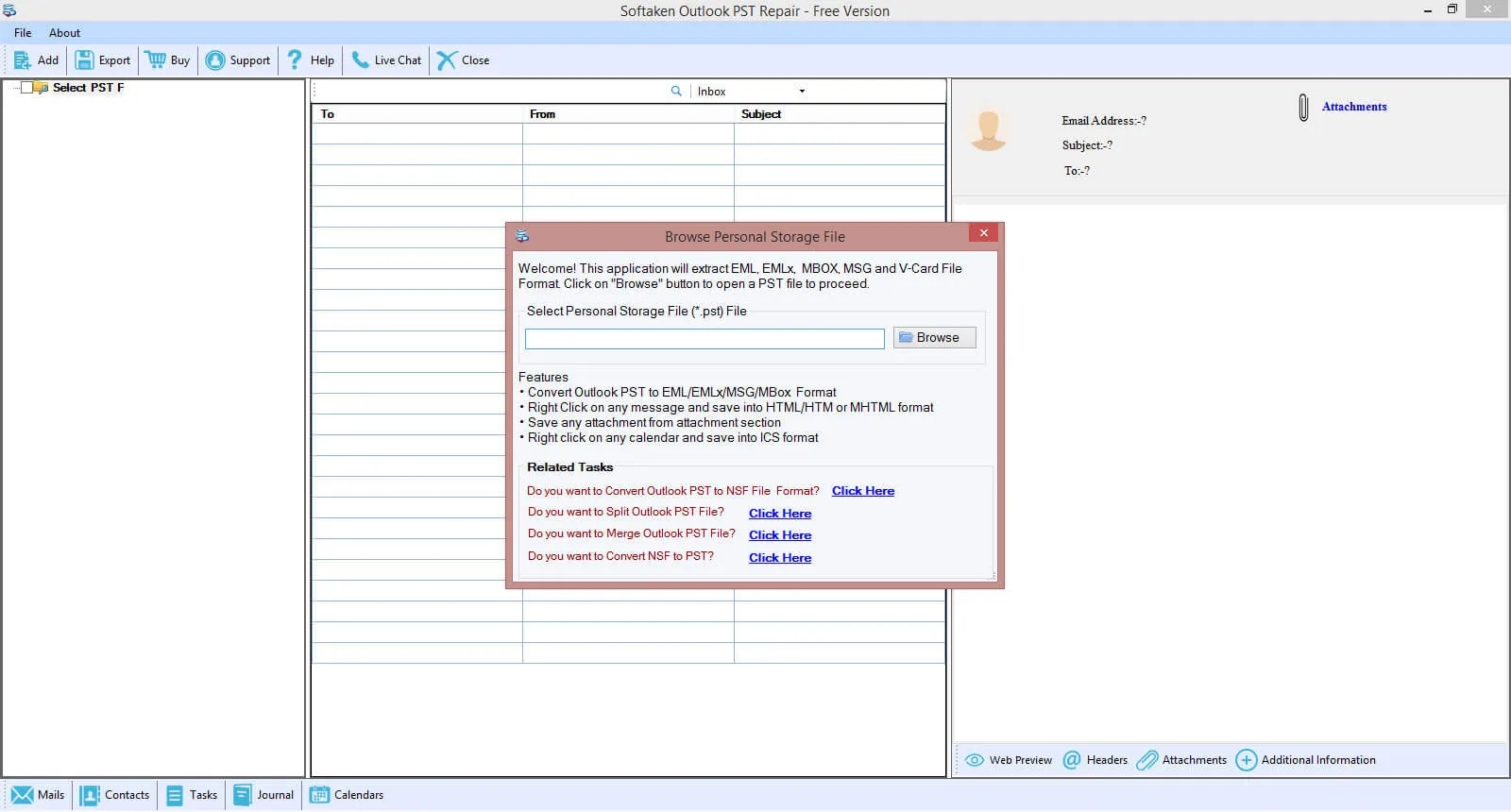
Add PST File: Click on the Add file (or browse) option to load the corrupted or inaccessible PST file into the program.
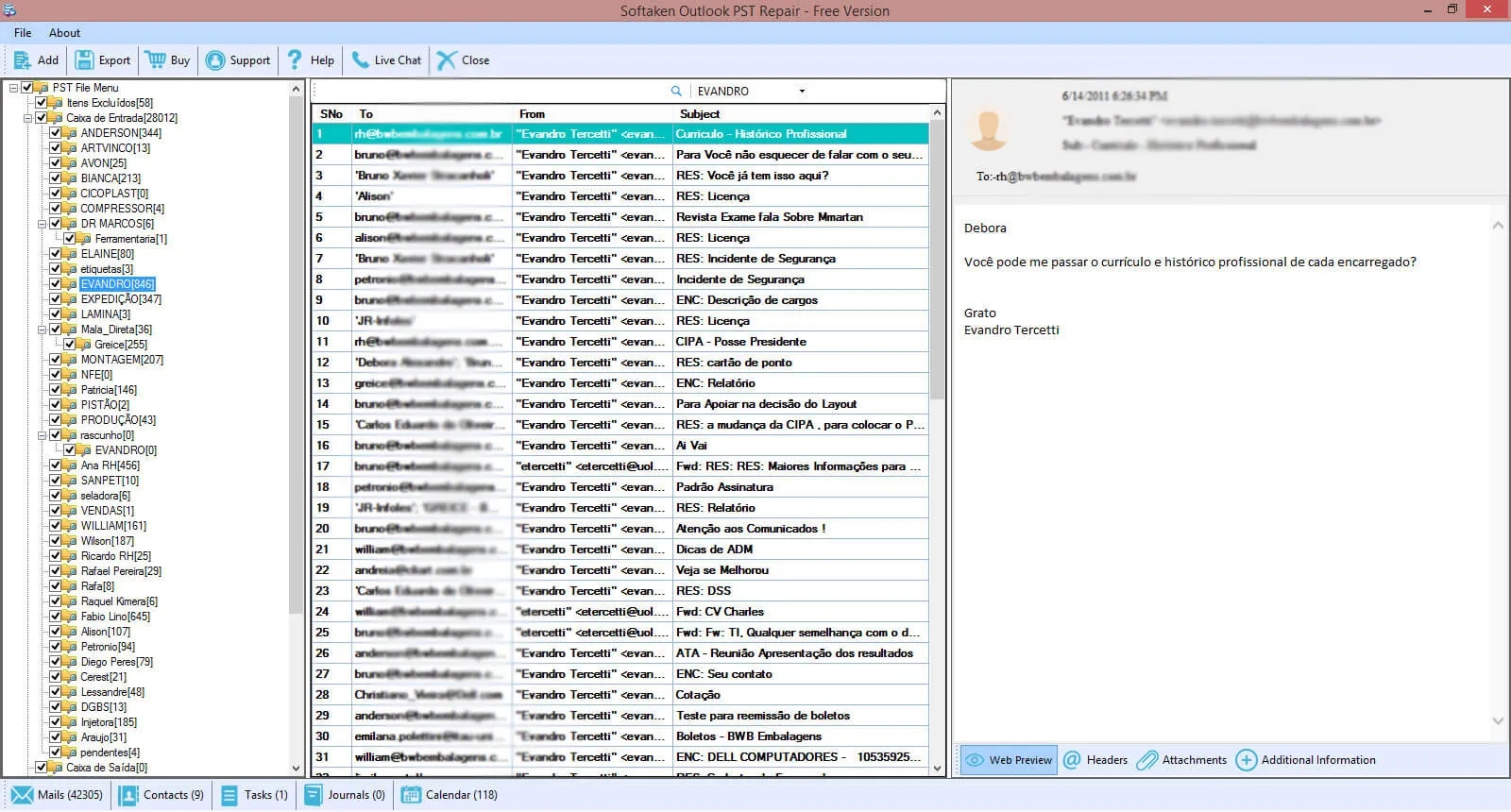
Auto Scan & Preview: Let the application automatically scan the selected PST file. Once the scan is complete, review all the recovered mailbox items displayed in a structured tree-view preview.
Select Repair/Export Option: Click on the Repair PST option and choose your required folders or items you wish to export.
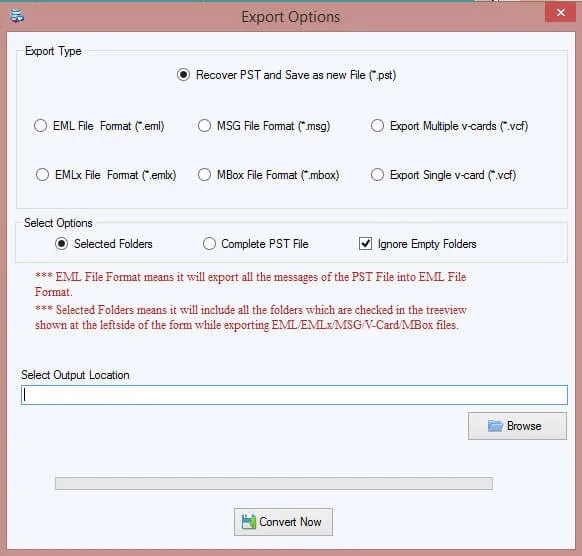
Choose Output Format and Save: Select your preferred saving format (such as PST, EML, EMLX or MBOX) and choose a destination path on your computer to save the recovered data.
The official documentation for the software also mentions Standard, Advanced and Deep recovery modes. These options are meant to give you different approaches depending on the severity of the corruption.
For a real hands on review, I would note the scan time, system specs, errors found and amount of recoverables shown. These details are more useful than just saying a scan is “fast.”
ANSI PST Recovery: What to Anticipate
ANSI recovery is particularly important when considering legacy Outlook archives. Older files may contain important client communications, invoices, project records and attachments that are difficult to retrieve after corruption.
For the 1.8 GB ANSI archive, the key evaluation points would be: whether the software
· Correctly identifies the file.
· Shows the original folder structure.
· Recovers readable email contents.
· Retains sender, recipient, subject and date information.
· Properly handles attachments without needless omissions.
it can recover mailbox items from ANSI and Unicode PST files and allows you to preview the recovered data before saving.
However, compatibility does not mean complete recovery from each damaged file. A badly corrupted archive may have missing, unreadable or otherwise permanently damaged records.
Handling Large Archives Unicode PST Repair
Unicode PST files are common in contemporary Outlook environments and can be considerably larger than older ANSI files. The example 9.6 GB archive would be about how the recovery process deals with more messages, attachments and folders.
According to the official page of product, it can repair large PST files without any fixed size limitation and export the recovered data while maintaining the folder hierarchy. It also means that you don’t have to install Outlook to recover.
Such features could be useful for organisations that perform archive recovery on a dedicated Windows machine. However, the "no fixed software size limit" should not be considered as a guarantee that every very large PST will be successfully recovered. The practical outcome can be affected by the available disc space, memory, file condition and the complexity of the mailbox.
Export and Preview Options
Preview is one of the most important stages of PST recovery workflow. The reviewer should check a number of folders and compare the recovered messages to any backups that might exist before saving anything.
The product documentation describes a tree based preview and selective recovery. It also supports PST, EML, EMLX and MBOX as export formats.
Exporting a small subset of the recovered messages as EML could be useful for the hypothetical archive of the consulting firm to see if the messages can be opened in another compatible email application. The reviewer should examine the body text, attachments, timestamps, and special characters, particularly in multilingual correspondence.
Benefits
· ANSI & Unicode PST recovery supported.
· Provides many recovery modes.
· Enables preview before saving.
· Retrieves email data and saves it in multiple email formats.
· The vendor states that installation of Microsoft Outlook is not required.
Limitations
· PST corruption level is a key factor for successful recovery.
· Preview does not guarantee that all items in a mailbox can be recovered.
· Actual recovery speed and completeness must be determined through practical testing.
· Saving restriction on trial version. According to its official page, only the first 10 items per folder can be saved.
Conclusion
Softaken PST Repair looks good for users who need to recover both ANSI and Unicode Outlook PST files. Its documented preview, multiple recovery modes and export options are definitely worth a shot, especially if you are dealing with legacy archives and damaged files that you cannot open normally.
But a good review should not guarantee 100% recovery. Users are recommended to test the software on copies of their own ANSI and Unicode PST files before purchasing and verify that the recovered data meets their requirements.
FAQs
1. Is it possible for PST Repair to recover ANSI PST files?
Yes. According to the official product page, the software can recover ANSI and Unicode PST files.
2. What are the differences between ANSI and Unicode PST files?
ANSI is an older format for Outlook data files and has less storage capacity. Unicode is a newer format that can support larger files and more characters.
3. Do I need to install Outlook to use PST Repair?
The vendor claims that PST mailbox data can be recovered without the use of Microsoft Outlook.
4. Is it able to recover large Unicode PST file?
The vendor states that the tool has no fixed size limitation to recover large PST files. Actual results depend on the state of the file and the recovery environment.
5. Is it possible to save recovered PST emails as EML?
Yes, the vendor lists EML as one of the export formats, along with PST, EMLX and MBOX.
6. Is the free trial period long enough to recover?
This trial will allow you to test the software and see what items you can recover. But the official page says that the saving is limited to 10 items per folder first, so it's not enough for an unrestricted recovery of a large archive.