
The spacebar is one of the most frequently used keys on a computer. You press it while typing, browsing, working, and playing games. Because it is used so often, turning it into a simple speed challenge can be a fun way to measure your keyboard response.
A Space bar game is an online tool that counts repeated spacebar presses during a selected period. Instead of guessing how quickly you can press the key, you receive a measurable result based on your total inputs and test duration. This makes the activity useful for casual challenges, keyboard practice, and basic input testing.
The idea is simple, but there are several ways to use a spacebar counter. You can compare scores, practice your rhythm, test different keyboards, or challenge friends to beat your result.
What Is an Online Spacebar Counter?
A spacebar counter is a browser-based tool that records how many times your computer detects the spacebar being pressed.
Most versions combine a counter with a timer. When the test starts, every valid press increases the total. When the timer reaches zero, the test stops and shows your final result.
For example, if you press the key 60 times during a 10-second test, your average rate would be:
60 ÷ 10 = 6 presses per second
This measurement is often called KPS, or key presses per second. Some websites may use CPS terminology because the activity is presented as a clicking challenge. The result gives you a simple way to compare different attempts and track your progress.
How Does the Test Work?
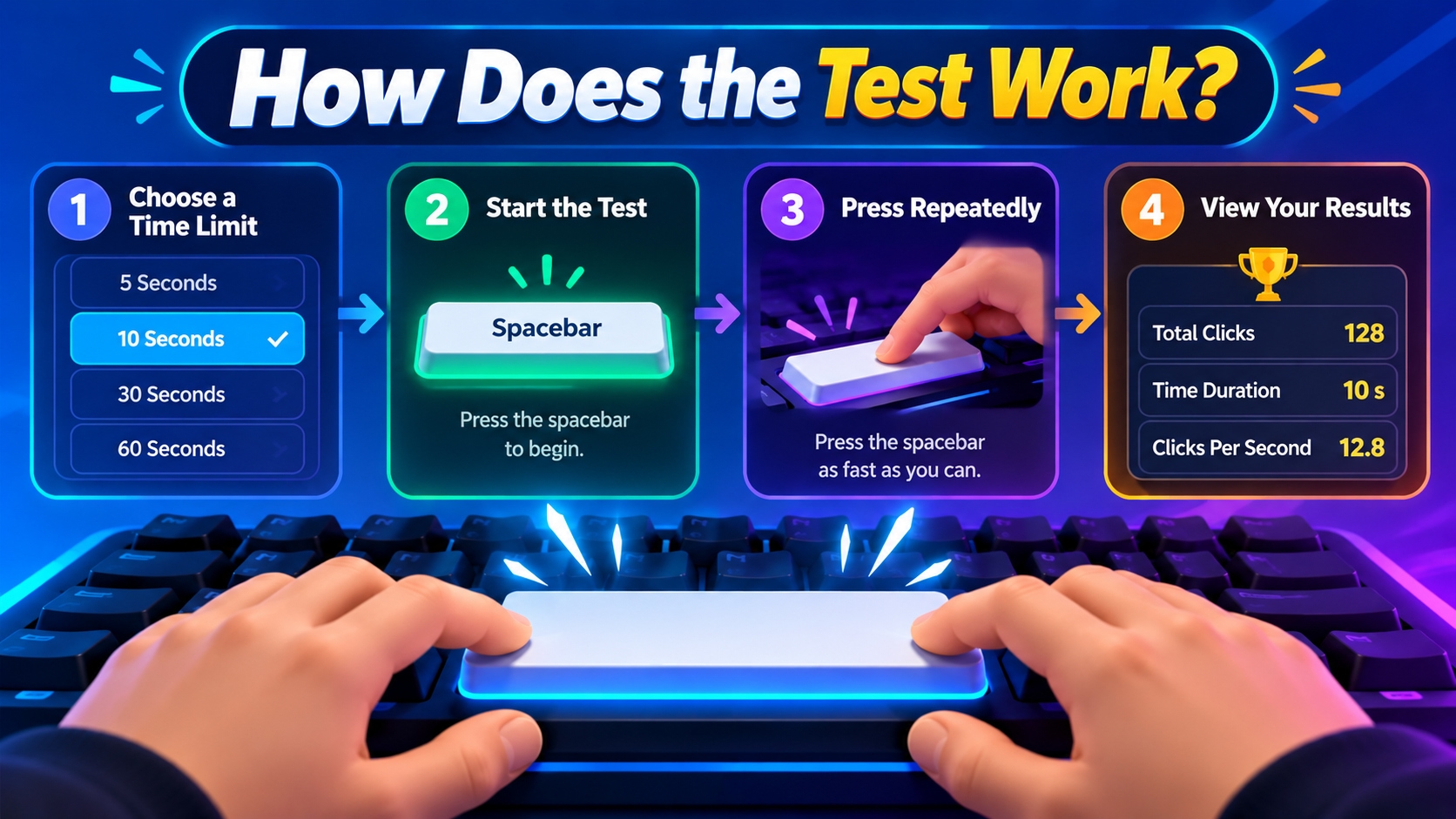
The technology behind an online key counter is relatively straightforward. When you press the spacebar, the webpage receives a keyboard event through the browser. The testing script detects the event and increases the counter.
A timer runs at the same time. When the selected period ends, the system stops accepting test inputs and calculates the final result.
A typical test follows this process:
Choose a testing duration.
Start the challenge.
Press the spacebar repeatedly.
Watch the counter increase.
Continue until the timer ends.
Review your final score.
Because the process happens inside the browser, there is normally no need to install special software.
Different Types of Spacebar Challenges
Not every online counter uses the same format. Different testing styles can focus on different aspects of keyboard performance.
1. Timed Press Test
This is the most common format. You have a fixed amount of time to register as many presses as possible. Short tests are useful for quick speed challenges, while longer tests can show how well you maintain your pace.
2. Custom Duration Test
Some tools let you select your own testing period. This can be useful if you want to compare your performance across different time limits. For example, you could compare a 5-second burst with a 30-second endurance session.
3. Long-Duration Challenge
Longer sessions place more focus on rhythm and consistency. Starting too quickly may cause your pace to drop later, so controlling your speed becomes more important.
4. Score-Based Challenge
Some versions add game-like features such as points, upgrades, milestones, or personal records. These features make a basic keyboard test feel more like an incremental browser game.
Why Do People Use a Spacebar Counter?
The main benefit is that it turns an everyday keyboard action into something measurable. You can establish a starting score, practice regularly, and compare later attempts.
This gives you a simple way to see whether your technique or consistency has changed. It can also be entertaining.
A short test takes only a few seconds, making it easy to challenge yourself during a break. Friends can also use the same timer and compare their results. This creates a simple competition without requiring a multiplayer game.
How It Can Help Gamers
Gamers often need quick and controlled keyboard inputs. The spacebar can be used for jumping, interacting, confirming actions, activating abilities, or performing other commands.
A keyboard pressing challenge gives you a simple environment for practicing repeated inputs without the distractions of a full game.
However, pressing speed is only one small part of gaming performance. A high KPS does not automatically make someone a better player. Competitive games also require reaction time, accuracy, decision-making, movement, game knowledge, and awareness.
The value of this activity is mainly in helping you become familiar with quick and controlled keyboard movements.
Improving Speed Without Losing Control
The fastest possible movement is not always the best approach. If you press randomly or use too much force, your rhythm can become inconsistent.
Start at a comfortable speed. Try to make each press smooth and controlled before increasing your pace.
Your hand should remain relaxed. Avoid unnecessary wrist movement and do not press the key harder than needed.
Once you find a comfortable rhythm, gradually increase your speed. This approach can make it easier to maintain your performance throughout the entire test.
Single-Finger Technique
The simplest method is to use one finger, usually the thumb, to press the spacebar repeatedly. Keep your finger close to the key and use a small movement rather than lifting your hand after every press.
A shorter movement can make repeated pressing feel smoother. The exact technique depends on your keyboard and what feels comfortable to you. You can also explore your keyboard settings to adjust certain input and accessibility options available on Windows.
Alternating Finger Technique
Some players experiment with using two fingers to create a faster rhythm. The idea is to alternate between fingers rather than relying entirely on one finger. This can increase the number of movements you can produce, but it also requires coordination.
Do not force this technique if it feels awkward or uncomfortable. A controlled single-finger rhythm can be more useful than an unstable technique that produces inconsistent inputs.
What Affects Your Pressing Speed?
Several factors can influence your result.
Keyboard Type - Different keyboards have different key designs. Mechanical, membrane, and laptop keyboards can vary in travel distance, actuation force, and overall feel. A keyboard that feels comfortable and responsive may make repeated pressing easier.
Hand Position - Your hand and wrist position can affect comfort and control. A relaxed position can help you maintain a steady rhythm for longer.
Practice - Repeated practice can help you become more familiar with the movement. Instead of practicing for a very long time, use short sessions and compare your results.
Test Duration - Your score can change depending on the timer. A 5-second challenge measures a short burst, while a 30- or 60-second test places more emphasis on maintaining your pace.
How to Track Your Progress
One of the easiest ways to improve is to keep a record of your results. Start with a few normal attempts and calculate your average. Do not focus only on your highest score because one unusually fast attempt may not represent your usual performance. Instead, look for gradual improvements.
For example:
Record your first three results.
Calculate your average.
Practice again after a short break.
Compare your new average with the old one.
Set a realistic next target.
This approach gives you a better understanding of your progress.
Make the Challenge More Fun
A keyboard counter does not have to be a serious test. You can turn it into a small competition with friends.
Choose the same time limit, use similar testing conditions, and compare your results. You can compete for the highest score or see who can maintain the most consistent pace.
You can also create personal milestones. Try to beat your previous score by a small amount instead of immediately chasing an extreme record. This makes the activity more achievable and keeps the focus on improvement.
Final Thoughts
An online spacebar counter takes one of the simplest keyboard actions and turns it into a measurable challenge. You can use it to check basic input response, practice your pressing rhythm, compare different keyboards, or compete with friends.
The most useful approach is to focus on consistency rather than chasing an extreme score immediately. Choose a comfortable test duration, keep your hand relaxed, practice in short sessions, and compare your results over time.
Whether you are a gamer, keyboard enthusiast, or casual browser user, a simple key press challenge can provide a quick and enjoyable way to test your keyboard skills.