
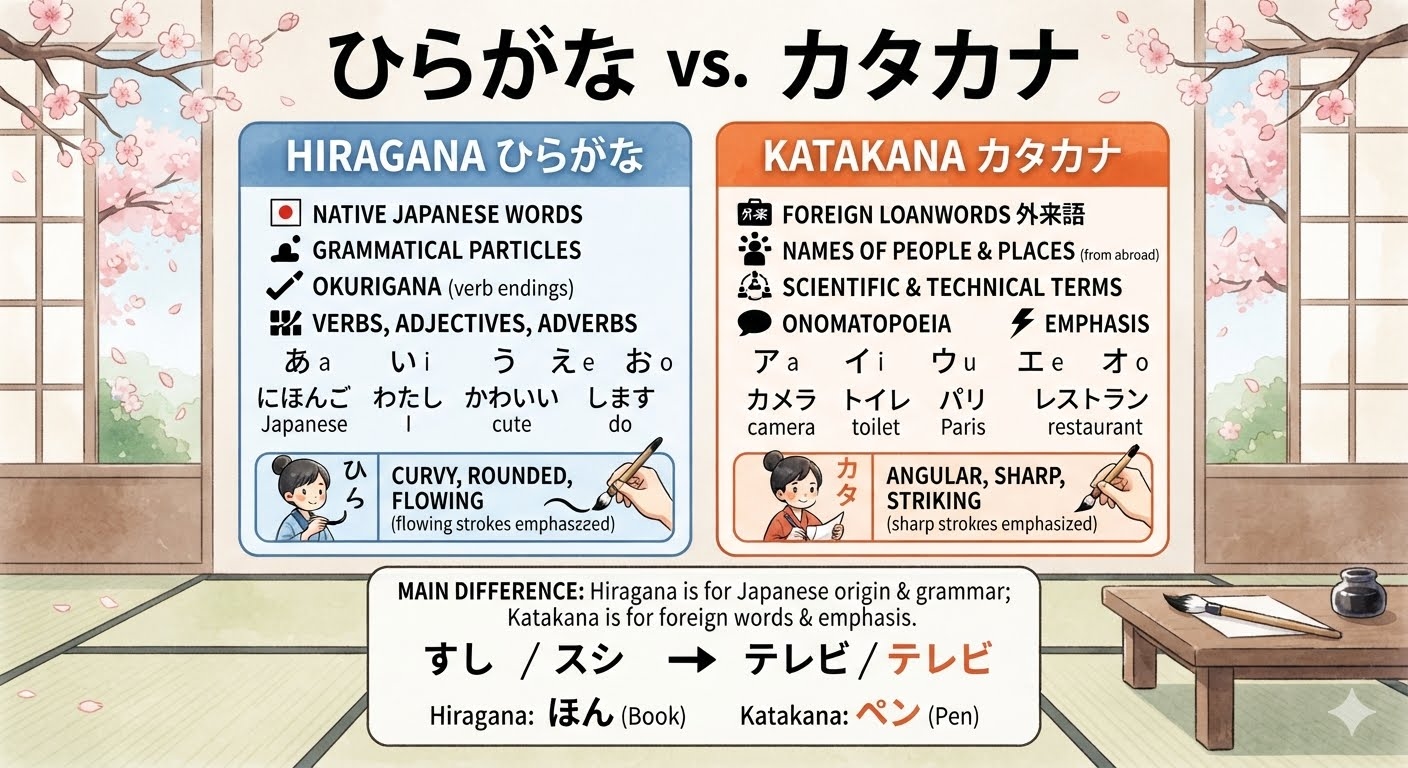
If you're starting your Japanese learning journey, one of the first hurdles you'll face isn't grammar or vocabulary — it's the writing system itself. Japanese uses three scripts: Hiragana, Katakana, and Kanji. Before you can tackle Kanji, you need to master the two phonetic alphabets that form the foundation of reading and writing Japanese. While they represent the same sounds, Hiragana and Katakana look different and serve different purposes, which often confuses beginners.
The good news is that you don't have to rely on textbooks alone. A number of well-designed apps can help you learn to recognize, write, and distinguish between these two scripts quickly and effectively. Below is a roundup of some of the best apps for the job, along with tips on how to use them.
Why Hiragana and Katakana Are Often Confused
Before diving into the apps, it helps to understand why these two scripts trip up so many learners. Hiragana is used for native Japanese words, grammatical particles, and verb conjugations, featuring soft, curvy characters like あ, い, and う. Katakana, on the other hand, is used mainly for foreign loanwords, onomatopoeia, and emphasis, and its characters are more angular and blocky, such as ア, イ, and ウ.
Since both scripts represent the exact same set of sounds (46 basic characters each), the difference lies entirely in shape and usage context — not pronunciation. This is precisely why visual repetition and contextual practice are so important, and why the right app can make a huge difference between hiragana and katakana in how quickly you internalize the distinction.
1. Duolingo
Duolingo is one of the most popular language-learning apps worldwide, and its Japanese course does a solid job of introducing Hiragana and Katakana side by side in early lessons. The gamified structure — with streaks, XP points, and bite-sized lessons — keeps beginners motivated. While Duolingo isn't purely focused on writing systems, it reinforces character recognition through repeated exposure in vocabulary and sentence-building exercises. It's a great starting point if you want a low-pressure, habit-forming introduction.
Best for: Casual learners who want daily practice woven into broader language study.
2. Kana Town
Kana Town is a minimalist, no-frills app designed specifically for memorizing Hiragana and Katakana. It uses flashcard-style drills and quizzes that test your recognition speed. Because it strips away distractions, it's particularly useful for learners who already have some familiarity with the scripts and want to drill their memory until recognition becomes instantaneous. The side-by-side comparison mode is especially helpful for spotting visual differences between look-alike characters, such as シ (shi) and ツ (tsu), or ソ (so) and ン (n).
Best for: Focused drilling and quick daily reviews.
3. Obenkyo
Obenkyo is a free, comprehensive Android app that covers Hiragana, Katakana, Kanji, and even grammar. What sets it apart is its handwriting recognition feature — you draw the character on your screen, and the app tells you whether you got it right. This is incredibly valuable because writing by hand (even digitally) helps cement muscle memory and reinforces the visual distinction between the two scripts far better than passive recognition alone.
Best for: Learners who want to practice actual stroke order and handwriting alongside recognition.
4. Human Japanese / Human Japanese Lite
Human Japanese takes a more narrative, textbook-like approach, walking you through Hiragana and Katakana with clear explanations, cultural context, and example words. It's less gamified than Duolingo but offers a deeper understanding of when and why each script is used. For learners who want to understand the "why" behind Katakana being used for foreign words like コーヒー (coffee) versus Hiragana for native words like ねこ (cat), this app provides valuable context that flashcard apps often skip.
Best for: Learners who prefer structured, explanatory lessons over pure repetition.
5. Anki (with Kana Decks)
Anki is a powerful spaced-repetition flashcard system beloved by language learners for its efficiency. While it requires some setup, there are pre-made Hiragana and Katakana decks available that use spaced repetition algorithms to show you characters right before you're likely to forget them. This method is backed by cognitive science and is particularly effective for long-term retention. Many learners use Anki specifically to drill the trickiest look-alike characters between the two scripts.
Best for: Learners who want scientifically optimized long-term memorization.
6. Kana Quest
Kana Quest turns the learning process into a puzzle game, using match-three mechanics to teach kana recognition in a fun, low-stress environment. Its charming art style and game-like progression make it appealing for younger learners or anyone who finds traditional flashcards tedious. Despite the playful format, it's surprisingly effective at reinforcing the visual differences between Hiragana and Katakana characters through repeated pattern recognition.
Best for: Learners who want a game-like, entertaining approach.
7. Japanese Kanji Tree / Kana Tree Apps
Several tree-based or progress-map apps visually chart your journey through both scripts, unlocking new characters as you master previous ones. These apps often combine mnemonics — associating each character's shape with a memorable image or story — with quizzes. Mnemonic-based learning is particularly useful for distinguishing Hiragana and Katakana characters that look similar, since attaching a unique visual story to each character reduces confusion.
Best for: Visual learners who benefit from mnemonics and progress tracking.
Tips for Getting the Most Out of These Apps
Practice both scripts together, not separately. Since confusion often arises from mixing them up, side-by-side comparison drills are more effective than learning one script fully before starting the other.
Write by hand whenever possible. Even if you're using a digital app, tracing or writing characters on paper reinforces stroke order and shape memory.
Use context, not just isolated characters. Learning kana within real words (like コーヒー for coffee or ありがとう for thank you) helps your brain associate shape with meaning and usage.
Combine apps. No single app does everything perfectly — pairing a gamified app like Duolingo with a spaced-repetition tool like Anki often yields the best results.
Test yourself regularly. Recognition speed matters. The faster you can identify a character without translating it in your head, the closer you are to true fluency.
Final Thoughts
Learning to distinguish between Hiragana and Katakana doesn't have to be a slow, frustrating process. With the right combination of apps — whether it's the gamified structure of Duolingo, the handwriting practice of Obenkyo, or the spaced repetition of Anki — you can build strong recognition skills in a matter of weeks. The key is consistent, varied practice that engages both visual memory and active recall. Once these two scripts become second nature, you'll be well on your way to tackling the next challenge in your Japanese studies: Kanji.




