Introduction
A purchase order arrives from a supplier, but something is not right. The supplier has entered the correct product details and quantities. Yet, SAP does not recognise a few fields. The problem is not necessarily the data itself. It may simply be the way the information has been arranged. This is one situation where custom mapping templates become useful in SAP CPI. Custom mapping templates and MIG-MAG guidelines are important topics covered in an SAP CPI Course Online.
Why Do Developers Need Custom Mapping Templates?
Think about a company that receives orders from several vendors. One vendor sends the supplier number as Vendor_ID. Another uses SupplierCode. SAP may expect the field under a completely different name.
Someone needs to connect these fields before the information can move further. That is essentially what mapping does.
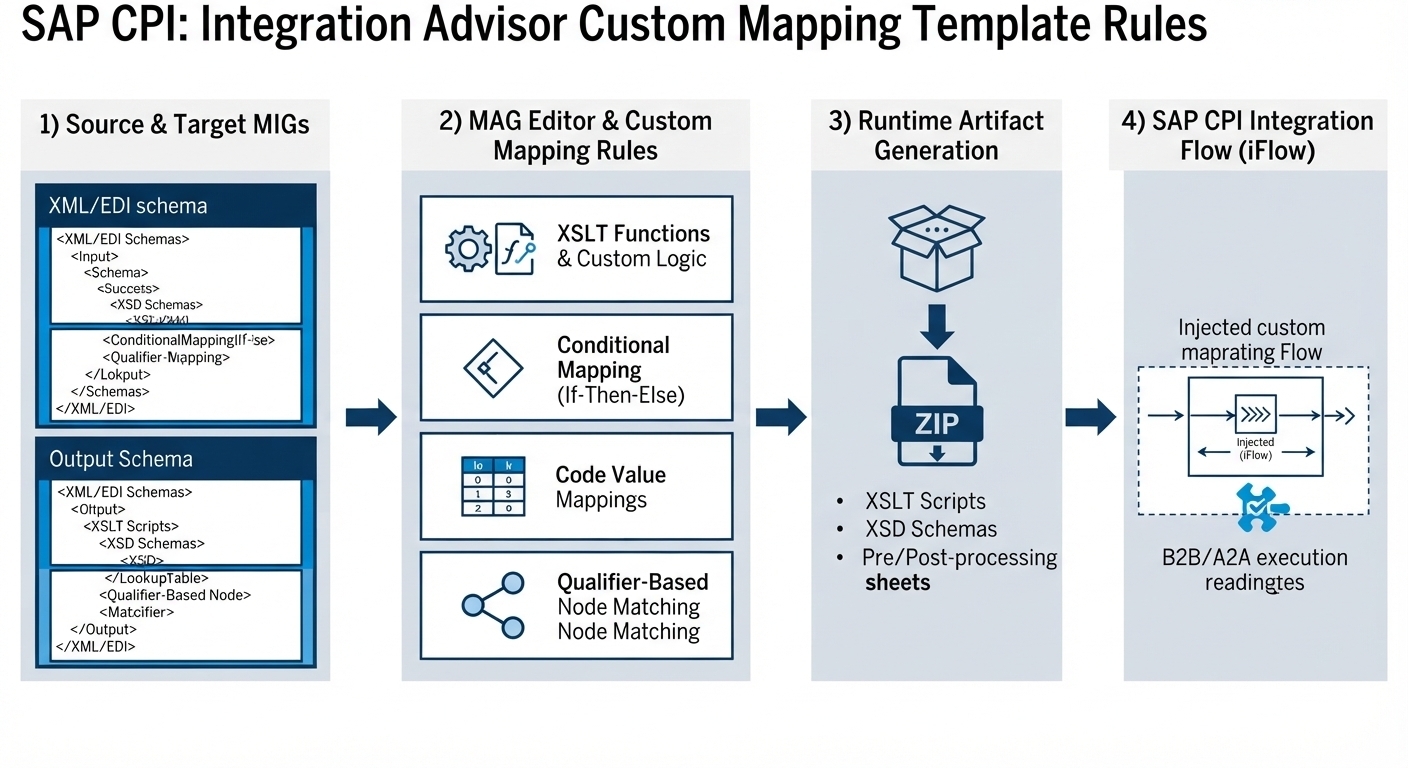
SAP Integration Advisor, available within SAP Integration Suite, helps developers work with message structures and mapping guidelines. It provides a way to define relationships between incoming and outgoing business messages. Instead of repeatedly working out the same field relationships, developers can build on existing mapping definitions.
This is useful for companies handling regular transactions with numerous suppliers, customers, business partners, etc.
Start With the Actual Message Structure
One mistake beginners sometimes make is jumping straight into field mapping. I would avoid that. First, look at the message coming from the source application. Check details like:
field names
data types
mandatory values
repeating sections
For example, consider a purchase order containing these details:
Incoming field | SAP field |
Vendor_ID | Supplier |
PO_Number | PurchaseOrder |
Product_Qty | Quantity |
Unit_Cost | NetPrice |
Mapping connects each incoming field with the target field. Two fields may have similar names without carrying exactly the same meaning. Developers need to understand the business context before connecting them.
An order quantity should not accidentally map to a delivery quantity. Both are numerical values, but they represent different things.
Mapping Rules That Can Cause Trouble
A custom mapping template needs more than a list of connected fields. It must account for differences in the way applications store and exchange information.
Here are a few situations worth considering.
Mandatory fields: Some information needs to be present. A purchase order may require details like:
supplier reference
company code
document date
incoming message that do not contain these values ensures that integration handles the problem using agreed error or default-value rule.
Date conversion: suppliers may send 18/11/2026. The receiving application expects 2026-11-18. Mapping must convert the value into the valid format.
Currency and decimal values: source application represents currency or decimal values differently. It is important to Check the expected format before one passes financial information to SAP. Small formatting issues often affect transaction processing.
Optional fields: suppliers often provide additional information. Others suppliers may leave those fields empty. Template must consider these differences.
One can join SAP CPI Course in Hyderabad for the best guidance in this field.
Where MIG and MAG Fit In
Beginners learning Integration Advisor may come across two terms: MIG and MAG. They sound complicated initially, but their roles are quite different.
Term | What it defines |
MIG | Structure and requirements of a business message |
MAG | Mapping relationships between message structures |
A Message Implementation Guideline (MIG) describes the structure that a message needs to follow. A Mapping Guideline (MAG) describes how fields from one message structure relate to fields in another.
For instance, a supplier's purchase order structure can be compared with the corresponding SAP purchase order structure. The MAG captures the required field relationships. Integration Advisor can also provide mapping suggestions. These are useful starting points, but developers should not accept every suggestion without checking it. Business meaning matters more than similar-looking field names.
Reusing Templates in Different Integrations
Imagine that your company works with eight suppliers. Most of them send purchase orders containing the same basic information. Their field names and formats differ slightly.
Would you create completely new mapping logic for every supplier? Not necessarily. A reusable template can provide much of the required mapping logic. It enables developers to adjust the fields that differ. Thus, they can retain parts that work fine.
In practice, I would pay attention to three things before reusing a template:
Compatibility of source and target structures.
Changes in mandatory fields or conversion rules.
Whether the new supplier sends additional or repeating fields.
One more point: keep track of template changes. When several developers work on related integrations, undocumented changes can create confusion later. Learning message transformation and integration rules also provides useful knowledge for professionals pursuing an SAP PM Course.
Testing Before Moving to Production
This is the part that deserves patience. A mapping may work perfectly with a sample message and fail when actual supplier data arrives. Try different inputs rather than testing only a normal purchase order.
For example, check what happens when:
The supplier reference is missing.
The order contains several product lines.
A date arrives in an unexpected format.
An optional field contains no value.
The source sends an incorrect currency code.
Once mapping is deployed within SAP Cloud Integration flow, one must check the transformed messages. Compare it with the structure expected by the receiving application. A successful transformation is only one part of the process. The target SAP system must also be able to process the resulting business document.
Conclusion
Custom mapping templates are not just about connecting one field to another. They help developers deal with the small differences that appear when business applications exchange information. A good template should reflect actual business requirements, handle missing values sensibly, and remain easy to update. I suggest beginners to focus on checking these details during development. This prevents repeated mapping issues once deployment is completed.