
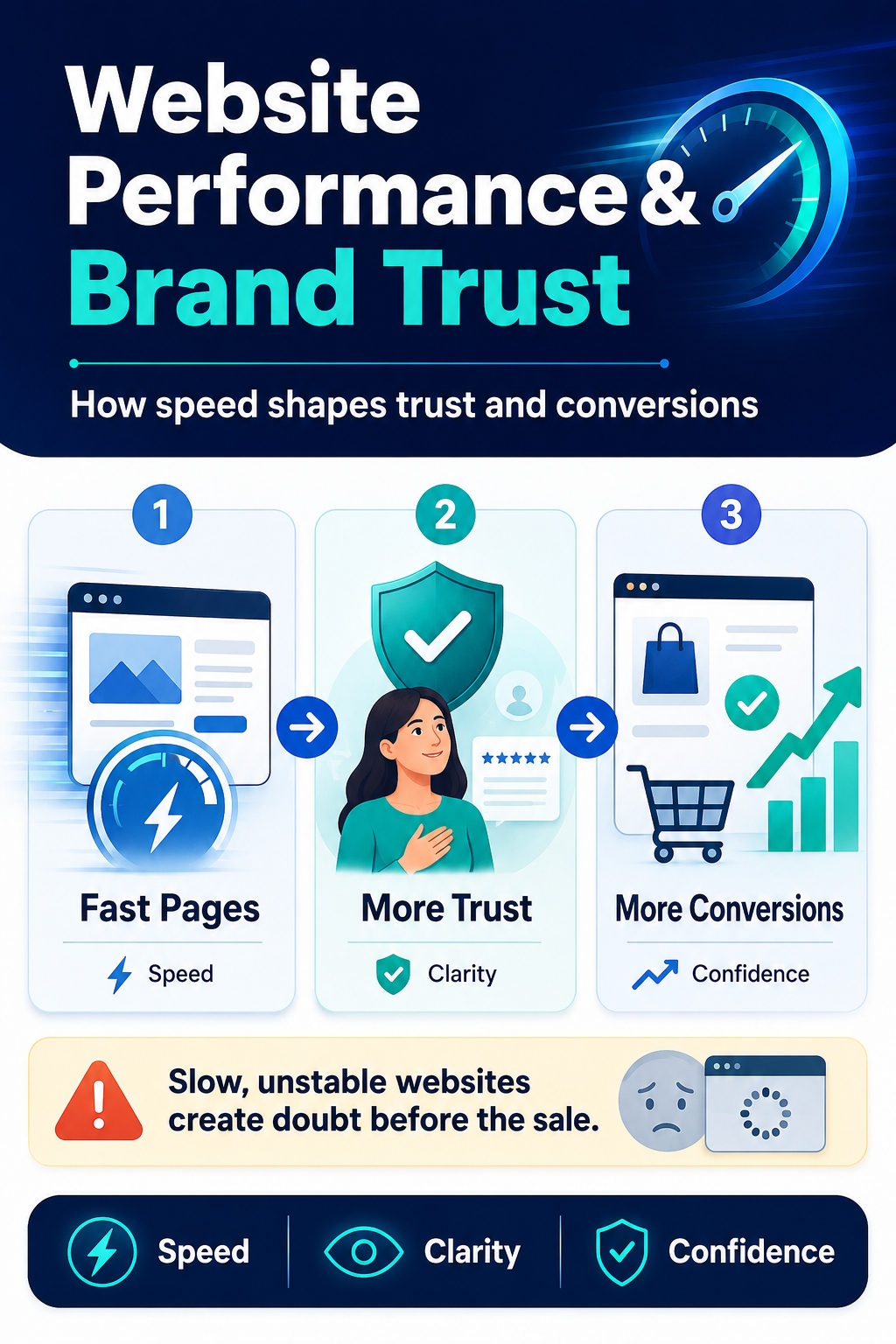
A customer’s experience with a business often begins before they read the offer, compare prices or evaluate its credibility. It begins with the website itself.
When someone arrives from Google, Pinterest, LinkedIn, X or an advertising campaign, the first moments shape what happens next. Does the page load smoothly? Do the buttons respond properly? Is the message immediately clear and consistent with the promise that brought the visitor there?
A website does not need to stop working completely to damage trust. Slow loading, shifting elements and delayed interactions can make the entire business feel less reliable. Confusing language, generic claims and inconsistent messages add further uncertainty, even when the underlying products or services are strong.
Website performance is therefore more than a technical concern. Speed, stability and responsiveness influence whether visitors stay, explore the offer, submit their details or complete a purchase.
However, a fast website can still lose customers when its message is unclear or its tone changes between pages. Technical quality creates the conditions for a good experience, while clear and consistent communication turns that experience into confidence.
This guide explains how website performance, brand voice and content consistency work together, where trust is commonly lost and what businesses should improve to turn more visitors into customers.
What Website Performance Really Means
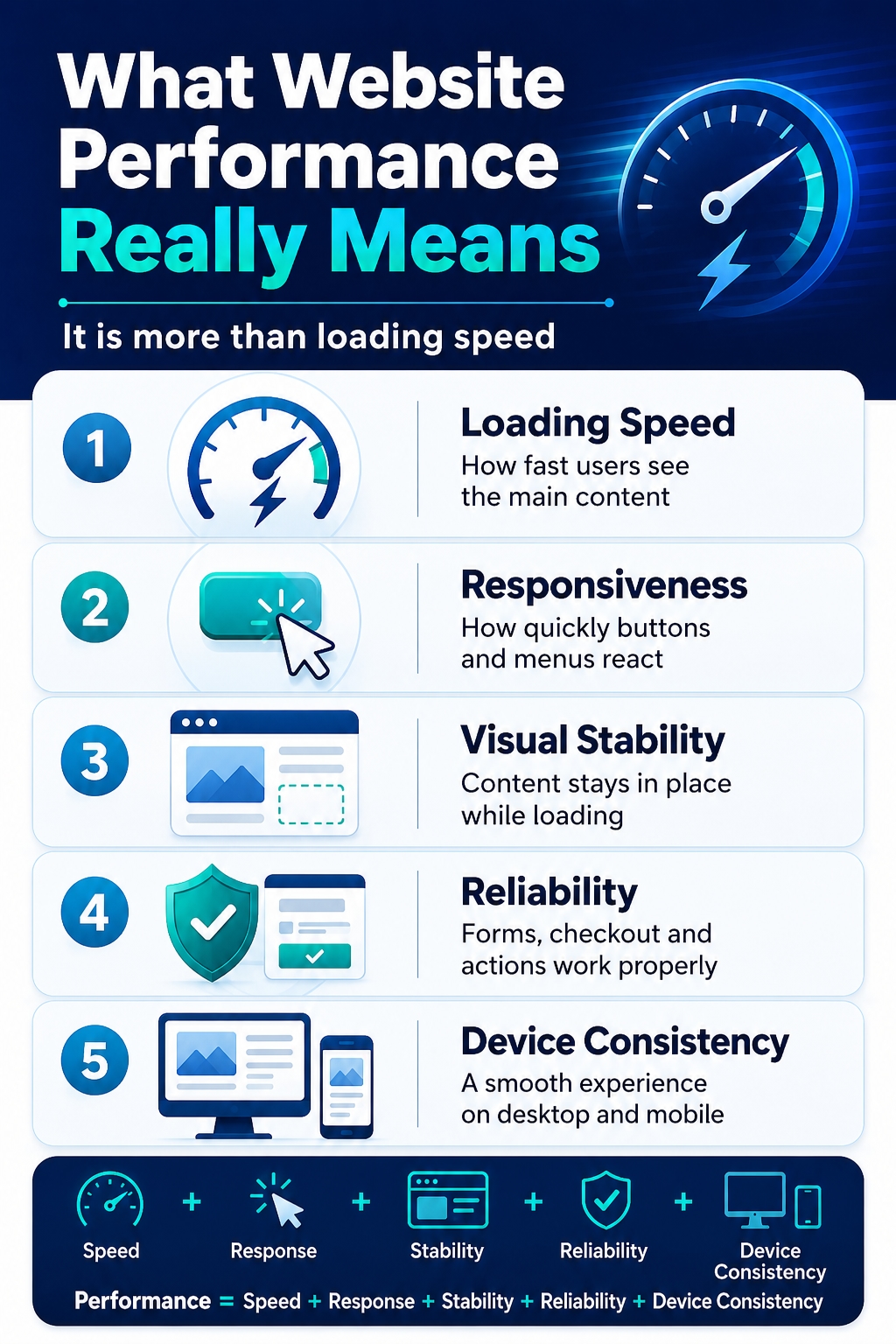
Website performance is often reduced to a single question: how quickly does the page load? Loading speed matters, but it is only one part of the experience. A website may display its main content quickly and still feel slow, unstable or unreliable when the visitor tries to use it.
A more complete view of website performance includes five connected areas.
Loading Speed
Loading speed describes how quickly the visitor can see and begin using the main content. A long blank screen, unfinished layout or slowly appearing images can create frustration before the person has had a chance to understand the offer.
The most important pages are not always the homepage. Landing pages, product pages, service pages, articles and checkout screens can each create a different performance experience. A fast homepage cannot compensate for a slow page where the customer is expected to make a decision.
Responsiveness
A website can appear fully loaded but still hesitate after a user clicks a button, opens a menu, selects a product option or submits a form.
These delays matter because visitors expect an immediate sign that their action has been recognised. When nothing happens, they may click several times, assume the page is broken or leave without completing the next step.
Responsiveness is especially important for:
navigation menus;
filters and search tools;
product variations;
forms;
shopping baskets;
payment and checkout elements.
Visual Stability
Visual stability refers to whether page elements remain in place while the content loads. Unexpected movement can cause users to lose their reading position or click the wrong button.
For example, a banner, advertisement or image may appear late and push the main content down the page. A call-to-action button may move just as the visitor tries to select it. Even when the page loads quickly overall, this behaviour makes the experience feel uncontrolled.
Reliability
Performance also includes whether important functions work consistently. A site that loads quickly but produces form errors, broken links or failed checkout requests cannot provide a strong customer experience.
Reliability covers issues such as:
forms that do not submit correctly;
buttons that sometimes stop responding;
pages that return errors;
lost basket contents;
failed searches;
incomplete payment confirmation;
features that work on one device but not another.
These failures create more than inconvenience. They can make users question whether the business is able to handle their enquiry, order or personal information properly.
Consistency Across Devices
Customers may first discover a business on a phone and later return on a laptop. Others may complete the entire journey on a mobile device. The website should therefore provide a reliable experience across different screen sizes, browsers and connection conditions.
A desktop page may appear fast because it is tested on a powerful computer and stable connection. The same page can become difficult to use on a phone when it contains large images, heavy scripts or controls that are not designed for touch.
Website performance should therefore be evaluated across the entire customer journey rather than through one score or one test. Loading speed, responsiveness, visual stability, reliability and device consistency work together. When one of them fails, the whole website can feel slower and less professional than its technical results suggest.
Why Website Performance Affects Brand Trust
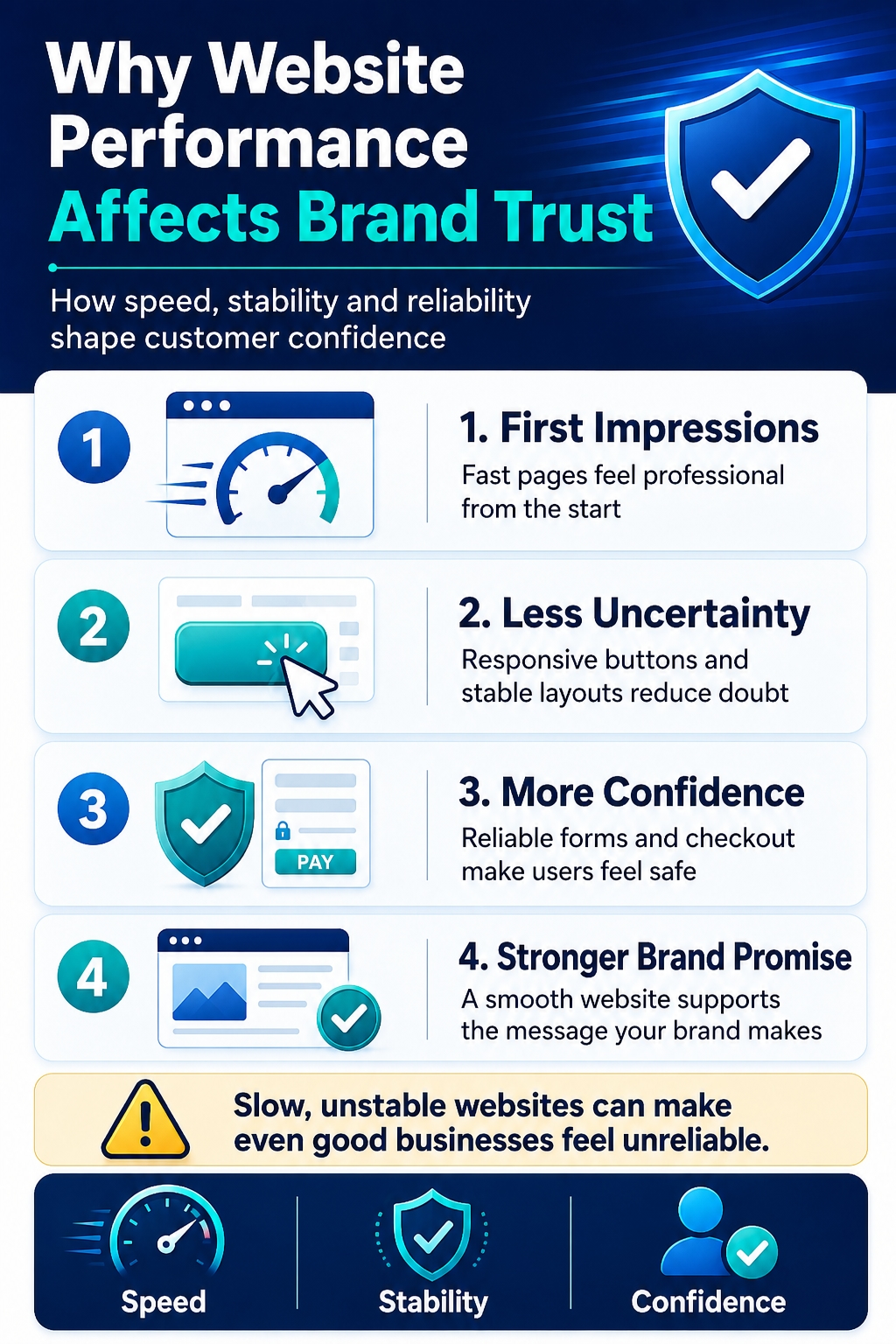
Visitors rarely know whether a performance problem is caused by weak hosting, inefficient code, oversized images or a third-party script. They simply experience the result. When a website feels slow, unstable or unpredictable, that experience can influence how they judge the business behind it.
A fast and reliable website suggests that the company is organised, prepared and capable of delivering a professional service. By contrast, repeated delays and errors can create doubt before the visitor has evaluated the actual offer. This is why website performance and brand trust are closely connected.
Performance Signals Competence
Users often treat the website as evidence of how the wider business operates. If pages open smoothly, controls respond immediately and important functions work correctly, the company appears more capable and dependable.
A poor experience can create the opposite impression. Visitors may begin to wonder whether the business pays attention to detail, maintains its systems properly or can provide the level of service it promises.
This judgement may not always be fair, but it happens quickly. Customers cannot see the internal processes behind a company, so they rely on visible signals. Website performance becomes one of those signals.
Stability Reduces Uncertainty
A stable website allows users to focus on the information in front of them. They can compare services, inspect products, read supporting content and move towards the next step without worrying about whether the page will work.
Unstable layouts, unresponsive buttons and unexplained delays interrupt this process. Each interruption introduces uncertainty and forces the visitor to think about the website instead of the offer.
A reliable experience answers several unspoken questions:
Will the next page open correctly?
Will the form submit successfully?
Will the product be added to the basket?
Will the payment process work?
Will the business receive the information provided?
When the site behaves predictably, these concerns remain in the background. When it does not, they can become a reason to leave.
Friction Creates Doubt
Not every performance problem causes an immediate exit. Some visitors continue, but their confidence gradually weakens.
A delayed product filter may make the catalogue feel difficult to use. A slow form may cause uncertainty about whether the request was submitted. A checkout page that pauses after every action may make customers reluctant to provide payment details.
These problems create friction at precisely the moment when the business needs the user to feel confident. The closer someone is to a conversion, the more damaging uncertainty can become.
Technical friction can therefore develop into a brand-level problem. The user is not evaluating page speed in isolation. They are deciding whether the entire experience feels safe, professional and worth continuing.
Poor Performance Weakens the Brand Promise
Website performance becomes particularly important when the brand promises speed, simplicity, innovation or customer care.
A company may describe its service as effortless, but a slow website makes the process feel difficult. It may present itself as modern, but unstable pages and broken controls suggest outdated systems. It may promise attentive support, but an unreliable enquiry form creates doubt about whether messages will be handled properly.
This gap between the brand promise and the actual website experience damages credibility. Strong design and persuasive content cannot fully compensate when the site behaves in a way that contradicts the message.
The most trustworthy websites create alignment between what the brand says and what the visitor experiences. The pages load reliably, the interface responds as expected and important actions work without unnecessary difficulty.
Performance is therefore not only about saving time. It helps demonstrate competence, reduce uncertainty and support the promises the business makes throughout its marketing.
How Website Speed Affects Conversions
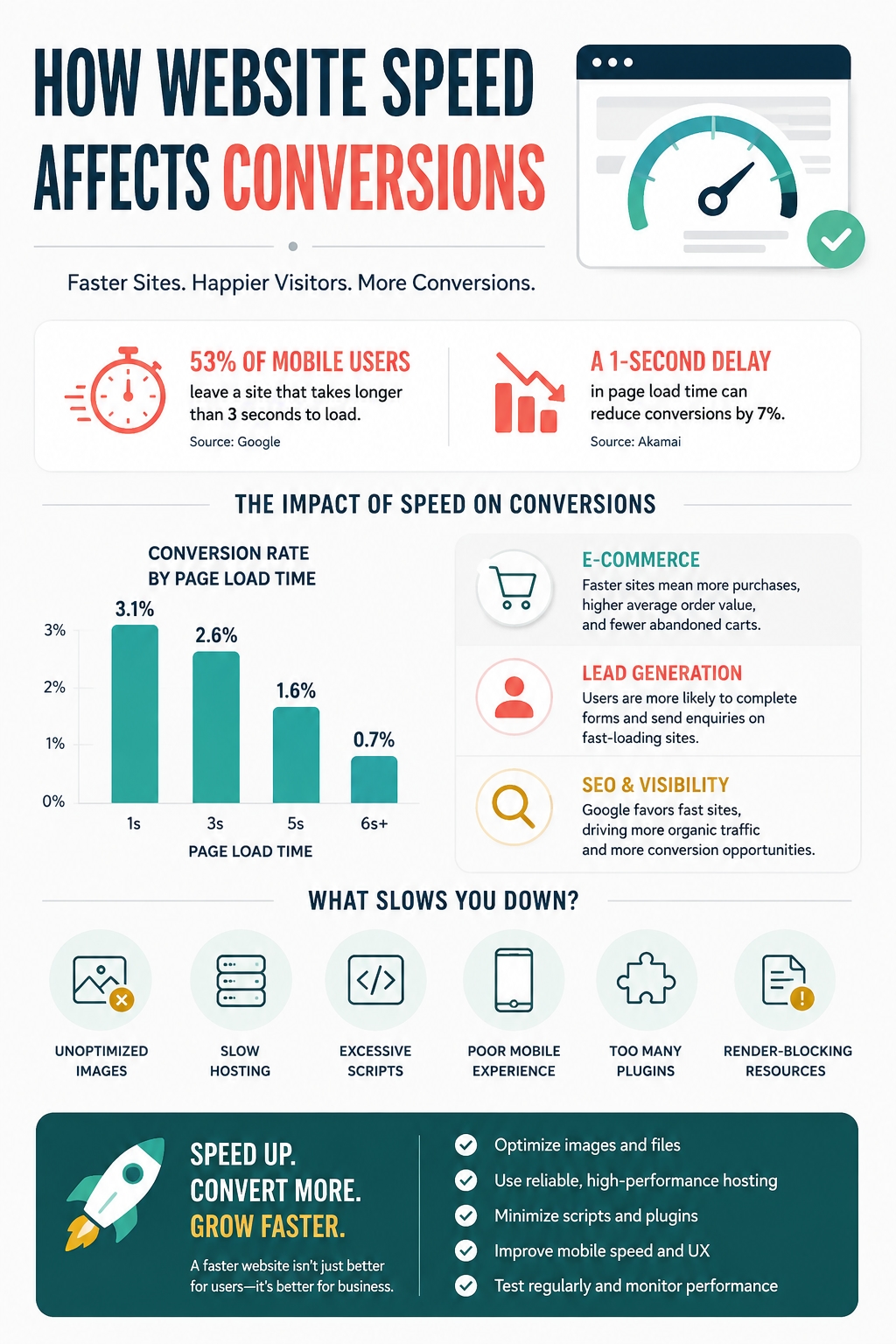
Website speed influences conversions because every delay adds friction between the visitor’s interest and the action the business wants them to complete. A user cannot submit a form, request a quote or buy a product if the page takes too long to become usable.
The effect is not limited to people leaving during the initial load. Slow performance can reduce engagement throughout the entire session. Visitors may read less content, view fewer pages and abandon the journey before reaching the main call to action.
Speed Determines Whether Visitors Stay
When a page opens slowly, users have little evidence that waiting will be worthwhile. Someone arriving from a search result or social platform can return to the previous page and choose another option within seconds.
This is especially damaging for landing pages because the business has already invested in attracting the visitor through SEO, social media, advertising or content marketing. If the destination performs poorly, part of that investment is wasted before the offer is evaluated.
Delays Reduce Content Engagement
A visitor may wait for the first page but become less willing to explore further. Slow navigation makes every additional click feel like another commitment of time.
As a result, users may not reach:
product or service details;
pricing information;
customer reviews;
case studies;
comparison pages;
FAQs;
contact or checkout forms.
This means strong content can fail to support conversions simply because too few visitors reach or fully consume it.
Friction Weakens Buying Intent
Visitors often begin with a certain level of interest. Each delay, failed interaction or unstable element reduces that momentum.
A slow product gallery can make comparison difficult. A delayed price calculator interrupts evaluation. An unresponsive call-to-action button creates doubt about whether the next step will work. On checkout and lead generation pages, these small problems appear at the most sensitive stage of the journey.
The relationship can be summarised as:
Delay → frustration → lower engagement → weaker confidence → fewer completed actions
Different Websites Lose Different Conversions
The final action varies by business model, but the underlying problem remains similar.
Lead generation sites lose form submissions and consultation requests.
Ecommerce stores lose basket additions and completed purchases.
SaaS websites lose trial registrations and demo bookings.
Local businesses lose calls, bookings and direction requests.
Publishers lose page views, subscriptions and affiliate clicks.
Membership sites lose registrations and renewals.
Website speed is therefore not only a technical metric. It affects whether acquired traffic produces a measurable business result.
The relationship between loading performance, user behaviour and completed actions is examined in more detail here:
https://medium.com/@wwwebadvisor/how-website-speed-affects-conversions-489751a34a01
Why Slow Websites Lose Customers Before the Sale
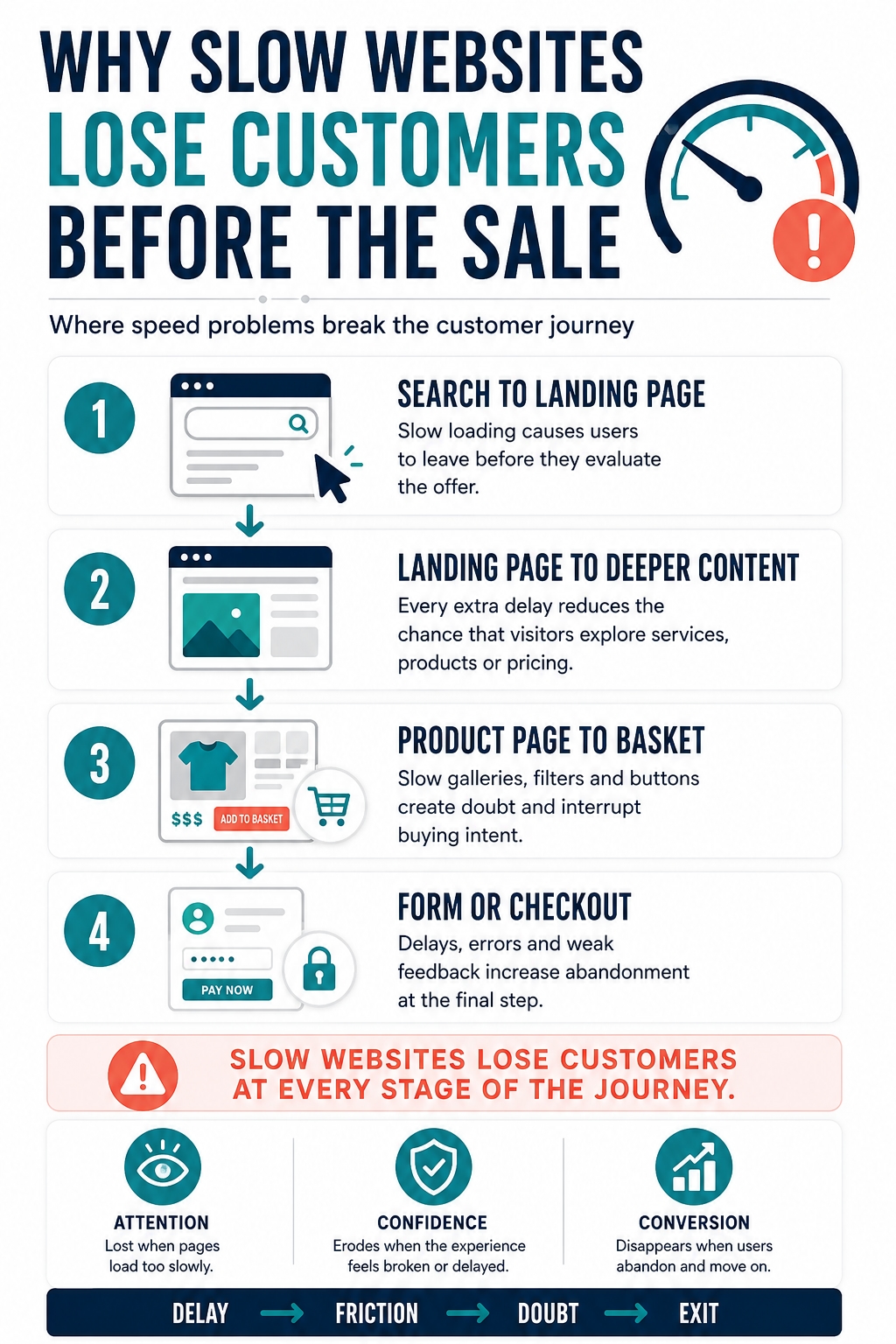
A slow website does not only reduce conversion rates. It can remove potential customers from the journey before they reach the point where a conversion is possible.
The damage often happens gradually. A visitor may tolerate the first delay but become less willing to open another page, compare options or complete a form. Each additional obstacle weakens confidence and increases the chance of abandonment.
Search Result to Landing Page
The first loss can happen immediately after the click. A user chooses a result from Google, Pinterest, LinkedIn or another source and expects quick confirmation that the page matches their need.
If the landing page loads slowly, appears incomplete or takes too long to reveal its main message, the visitor may return to the previous platform and choose another result. The business loses the opportunity before its offer has been evaluated.
This is especially costly when traffic comes from:
paid advertising;
competitive search queries;
social media campaigns;
influencer mentions;
email promotions;
affiliate placements.
In each case, the business has already invested in attracting attention. Poor performance wastes part of that investment.
Landing Page to Deeper Content
Visitors rarely make a decision from one headline. They may need to view service details, product information, prices, case studies, reviews or FAQs.
Slow navigation makes each additional step feel more difficult. A visitor who was initially interested may decide that the website requires too much effort and leave before reaching the strongest evidence supporting the offer.
This creates a hidden problem: the business may have useful content, but website friction prevents people from discovering it.
Product Page to Basket
On ecommerce websites, product pages often contain image galleries, reviews, recommendations, availability checks and variation selectors. These features help customers make decisions, but they can also create delays.
When product options respond slowly or the add-to-basket button appears unreliable, users may hesitate. They may question whether the selected variation is correct, whether the basket has updated or whether the checkout will work properly.
At this stage, performance problems do not simply waste time. They introduce uncertainty into the buying decision.
Form and Checkout Abandonment
Forms and checkout pages are especially sensitive because the visitor is close to completing an important action.
Common problems include:
delayed field validation;
unresponsive buttons;
payment elements that load slowly;
unclear progress after submission;
errors that remove entered information;
confirmation messages that do not appear.
When the website provides no immediate response, users may submit the form several times, refresh the page or abandon the process. Some may worry that their information or payment details have not been handled correctly.
Lost Return Visits
The impact can continue after the session ends. A visitor who remembers a site as slow or unreliable may avoid returning, even if the company later appears again in search results or social media.
This affects more than one conversion. It can reduce repeat visits, direct traffic, recommendations and long-term customer value.
A broader breakdown of where and why slow websites lose potential customers is available here: https://volodymyrzh.medium.com/why-slow-websites-lose-customers-67c1fc46cd54
Performance Is Not the Only Trust Factor
Website performance creates the conditions for a positive experience, but speed alone does not make a website trustworthy. A page can load instantly and still confuse visitors, weaken confidence or fail to explain why the business deserves attention.
Trust is usually built through several connected layers. Technical performance helps users access the experience, while design, information and communication determine what they think once they arrive.
Technical Trust
Technical trust comes from a website behaving as expected. Pages open correctly, buttons respond, forms work and important actions do not produce unexplained errors.
Visitors may not consciously describe this as trust, but reliable behaviour reduces uncertainty. They can focus on the offer rather than questioning whether the website will complete the next action.
Technical trust is weakened by:
slow or inconsistent loading;
broken links;
unresponsive controls;
failed forms;
checkout errors;
security warnings;
features that work differently across devices.
Visual Trust
Design influences whether a website feels organised and credible. This does not mean every business needs an expensive or complex visual identity. Clear hierarchy, readable text and consistent layouts are often more important than decorative effects.
Visual trust can decline when:
important information is difficult to find;
typography is hard to read;
pages use inconsistent colours or layouts;
pop-ups cover the main content;
images appear outdated or irrelevant;
mobile pages feel compressed or unfinished.
A polished design cannot fully compensate for poor performance, but weak presentation can undermine an otherwise reliable website.
Informational Trust
Visitors need enough specific information to evaluate an offer. Generic statements such as “high-quality service” or “the best solution” provide little evidence and can make the content feel interchangeable with competitors.
Informational trust grows when the website clearly explains:
what the business provides;
who the offer is for;
how the process works;
what is included;
what limitations apply;
how pricing is determined;
what the customer should expect next.
Accuracy also matters. Contradictory prices, outdated product details or unsupported claims can damage credibility even when the site performs well.
Communication Trust
Tone of voice affects how information is interpreted. The same facts can feel clear and reassuring or vague and overly promotional depending on how they are presented.
Communication trust depends on whether the website:
uses language appropriate for its audience;
explains complex ideas without unnecessary jargon;
avoids pressure and exaggerated promises;
maintains consistent terminology;
gives clear instructions;
uses calls to action that match the decision being requested.
A business may sound professional on its homepage but become generic on product pages or abrupt in form messages. These changes can make the customer journey feel disconnected.
Trust Is Cumulative
No single trust signal is enough on its own. A fast website with confusing content may still convert poorly. Strong copy cannot rescue a checkout that repeatedly fails. Attractive design cannot replace accurate information.
The strongest experience combines:
reliable technical performance;
clear visual structure;
useful and verifiable information;
consistent brand communication.
Performance helps users remain in the journey. The other trust factors give them reasons to continue.
How Tone of Voice Influences Website Conversions
Website conversions depend not only on what a business offers, but also on how that offer is explained. Tone of voice shapes whether visitors understand the message, believe the claims and feel comfortable taking the next step.
A consistent brand voice can reduce uncertainty across the customer journey. It helps users recognise the business, interpret information faster and understand what kind of experience they should expect.
Clear Language Reduces Hesitation
Visitors should not need to decode complicated language before making a decision. Clear website copy helps them understand:
what is being offered;
who it is for;
how it works;
what it costs;
what happens after the next action.
Vague wording increases cognitive effort. When users must interpret unclear claims or search for missing details, they have more reasons to postpone the decision.
Clarity is especially important on pricing pages, product pages, forms and checkout screens, where uncertainty can directly reduce conversions.
Tone Should Match the Decision
Different stages of the customer journey require different communication. An educational article may use an explanatory tone, while a checkout page should be direct, reassuring and easy to scan.
The tone should also reflect the importance of the decision. A casual phrase may suit a low-cost consumer product but feel inappropriate when someone is choosing a financial, legal or technical service.
This does not mean changing the brand personality from page to page. It means adapting the same voice to the user’s context.
Generic Language Weakens Differentiation
Many websites rely on phrases such as:
high-quality solutions;
customer-focused service;
innovative approach;
trusted professionals;
industry-leading results.
These statements may sound positive, but they provide little useful information. Because competitors can make the same claims, generic language does not help visitors understand why they should choose one business over another.
More effective copy replaces broad claims with specific explanations, examples, processes and evidence.
Overpromising Damages Credibility
Aggressive claims can attract attention, but they also increase scepticism. Promises such as guaranteed results, instant success or the best service in the market require strong proof.
If the wider website experience does not support the claim, the message can reduce trust instead of increasing it. A company that promises an effortless process but provides confusing forms creates a visible contradiction.
The strongest tone of voice is persuasive without becoming unrealistic. It communicates value while remaining accurate and consistent with what the business can deliver.
Calls to Action Should Feel Consistent
A call to action should continue the conversation created by the page. If the content is helpful and measured but the CTA suddenly becomes aggressive, the visitor may feel pressured.
Effective CTA language explains the next step and reduces uncertainty. Depending on the page, this may include:
Request a detailed quote
Compare available options
Book an initial consultation
Start your free trial
Continue to secure checkout
The wording should match both the brand voice and the level of commitment being requested.
Tone of voice supports conversions when it makes the offer easier to understand, reduces doubt and guides visitors towards a clear next action.
The connection between tone of voice, customer confidence and conversion decisions is explored in greater detail here:
https://seolabsdp.blogspot.com/2026/04/how-tone-of-voice-affects-conversion.html

Where Performance and Brand Voice Work Together
Website performance and brand voice are often managed separately. Developers focus on speed and reliability, while content teams focus on clarity, tone and persuasion. From the visitor’s perspective, however, these elements form one experience.
A page cannot communicate effectively if users leave before it becomes usable. At the same time, fast loading does not create value when the message is confusing or inconsistent.
Homepage
The homepage must quickly confirm that the visitor has reached the right business.
Performance requirement: The main content, navigation and value proposition should appear without unnecessary delay or disruptive movement.
Communication requirement: The page should clearly explain what the business provides, who it helps and what users can do next.
Risk if either fails: A slow homepage creates frustration, while a vague homepage gives visitors no reason to continue.
Landing Pages
Landing pages receive focused traffic from search results, social media, email and advertising campaigns. The promise made before the click should continue after the visitor arrives.
Performance requirement: The page should load quickly and remain stable, especially on mobile devices.
Communication requirement: The headline, supporting copy and call to action should match the campaign message and the user’s intent.
Risk if either fails: Poor performance wastes acquired traffic. Message inconsistency makes the visitor question whether the page is relevant.
Product and Service Pages
These pages help users compare options and judge whether the offer suits their needs.
Performance requirement: Images, variations, pricing tools and interactive elements should respond reliably.
Communication requirement: The content should provide specific benefits, limitations, features, pricing information and next steps.
Risk if either fails: Technical delays interrupt evaluation, while generic descriptions prevent meaningful comparison.
Forms
Forms convert interest into an enquiry, registration or booking.
Performance requirement: Fields, validation and submission controls should work immediately and preserve entered information.
Communication requirement: Instructions should explain what information is required, why it is needed and what happens after submission.
Risk if either fails: A broken form prevents the conversion. Unclear instructions make the process feel more difficult or intrusive.
Checkout
Checkout pages combine the highest level of intent with the greatest sensitivity to uncertainty.
Performance requirement: Basket updates, payment elements and order confirmation should work without unexplained delays.
Communication requirement: Costs, delivery details, payment steps and error messages should be direct and reassuring.
Risk if either fails: Technical problems can stop the purchase, while confusing copy can make customers hesitate or abandon the order.
Performance Delivers the Message
The relationship can be summarised simply:
Speed determines whether the message is reached.
Clarity determines whether the message is understood.
Consistency determines whether the message is believed.
Reliability determines whether the action is completed.
Neither website performance nor brand voice should be optimised in isolation. The strongest customer experience appears when the site works smoothly and communicates clearly at every important step.
The Customer Journey: Where Trust Is Built or Lost
Website trust is not created by one page or one design element. It develops across the customer journey, from the first contact with the brand to the completed action and return visit.
At every stage, users compare what they expected with what the website delivers. Slow performance, unclear messages or inconsistent experiences can weaken confidence even when earlier interactions were positive.
Discovery
The journey may begin with a Google result, Pinterest pin, LinkedIn post, X update, advertisement or email. Before visiting the website, the user already receives a promise through the headline, description and visual presentation.
The destination page should continue that promise. If the social post discusses one problem but the linked page focuses on something different, the experience immediately feels disconnected.
Trust begins when the website accurately reflects the message that encouraged the click.
First Page View
The first page must quickly answer three questions:
Am I in the right place?
Is this relevant to my needs?
Is it worth continuing?
Loading speed affects whether the visitor stays long enough to find those answers. The headline, introductory copy and page structure then determine whether the offer is understood.
A slow page creates impatience. A vague page creates confusion. When both problems appear together, abandonment becomes much more likely.
Evaluation
Visitors often need evidence before making a decision. Depending on the website, they may review:
service descriptions;
product specifications;
prices;
case studies;
customer reviews;
FAQs;
delivery or return policies;
company information.
Performance must remain consistent as users move between these resources. Clear language and stable terminology also matter. Conflicting prices, unclear conditions or different claims across pages can damage website trust at the evaluation stage.
Decision
The decision stage includes actions such as requesting a quote, booking a consultation, starting a trial, adding a product to the basket or beginning checkout.
This is where small points of friction become especially costly. An unresponsive button, confusing CTA or unexpected form requirement can interrupt the customer journey just before conversion.
The website should make the next step clear, explain what information is required and respond immediately after the user acts.
Confirmation
Trust continues after the form or payment is submitted. The visitor needs clear confirmation that the action was successful.
A useful confirmation experience should explain:
whether the request or order was received;
what happens next;
how long the next step may take;
where the user can find additional information;
how to contact the business if something is wrong.
A missing or unclear confirmation message can leave users uncertain even when the transaction technically succeeded.
Return Experience
Many conversions require more than one visit. Customers may return to compare options, review information or complete an action later.
A consistent return experience helps them continue without restarting their evaluation. Familiar navigation, stable performance and recognisable brand voice reinforce confidence.
The customer journey can be summarised as:
Traffic creates an opportunity.
Performance preserves attention.
Communication builds confidence.
Consistency supports trust.
A clear path enables conversion.
Businesses should therefore test complete journeys rather than isolated pages. A strong homepage cannot compensate for a confusing product page, broken form or unreliable checkout.
Why Content Consistency Matters as a Website Grows
Content consistency is easier to maintain when one person controls every page. As a website grows, more writers, departments, freelancers and AI tools become involved. Without shared rules, terminology, tone and key messages gradually begin to differ.
Individual pages may still look professional, but the website can start to feel like a collection of unrelated materials rather than one connected brand.
Growth Creates Inconsistency
Growing websites usually add blog articles, landing pages, product descriptions, help content, emails and social posts. Each format requires a different approach, but the underlying brand voice should remain recognisable.
Common causes of inconsistency include:
several writers using different terminology;
outdated pages remaining beside newer content;
departments describing the same offer differently;
AI-generated copy published without proper editing;
freelancers working without brand voice guidelines;
conflicting calls to action across related pages.
Small differences accumulate and make the customer journey harder to follow.
Inconsistency Weakens Brand Recognition
A consistent brand voice helps users recognise the same organisation across different pages and channels. The tone may become more educational in an article or more direct during checkout, but the core personality and communication principles should remain stable.
Sharp changes in style force visitors to adjust repeatedly. One page may sound clear and helpful, while another becomes formal, generic or full of jargon. This weakens brand recognition and can make the information feel less reliable.
Conflicting Messages Create Uncertainty
Content consistency also covers facts, promises, prices and explanations of how the service works. Trust can decline when users find:
conflicting prices or package descriptions;
different delivery times;
inconsistent product specifications;
several names for the same service;
outdated information in FAQs;
contradictory next steps.
Visitors may delay a decision because they are unsure which information is correct.
A Framework Makes Consistency Scalable
A growing team cannot rely on memory alone. It needs a practical content consistency framework that writers, editors and marketers can use during production and review.
The framework should define:
preferred terminology;
key brand voice characteristics;
claims and phrases to avoid;
rules for adapting tone by page type;
standards for headings and calls to action;
ownership of factual updates;
review responsibilities.
The purpose is not to make every page sound identical. It is to keep content accurate, recognisable and connected while allowing different formats to serve different needs.
A practical framework for maintaining content consistency without making every page sound identical is available here:
https://seolabsdp.blogspot.com/2026/05/how-to-build-content-consistency.htm
Common Website Problems That Damage Trust
Website trust is often weakened by a combination of small problems rather than one obvious failure. A page may still load and the business may still look legitimate, but repeated friction makes users less confident about continuing.
The most damaging issues usually affect performance, clarity or reliability at important stages of the customer journey.
1. Slow Initial Loading
A long blank screen or incomplete layout creates a poor first impression. Visitors may leave before they see the main offer, especially when they arrive from competitive search results, ads or social media.
Impact: Less engagement and fewer users reaching the main content.
Recommended action: Test high-traffic landing pages on mobile devices and slower connections, not only on a fast desktop setup.
2. Delayed Response After Clicks
Buttons, filters, menus and forms may appear ready but respond slowly. Users can assume that the action failed and click repeatedly or abandon the page.
Impact: Confusion, duplicate actions and reduced confidence.
Recommended action: Check interactive elements separately from initial page-loading speed.
3. Unstable Page Layouts
Late-loading images, banners and embedded content can move text or buttons while users are reading or clicking.
Impact: Accidental clicks and an experience that feels uncontrolled.
Recommended action: Reserve space for media and avoid inserting important elements above content after the page begins loading.
4. Broken Forms and Checkout Errors
A form that removes entered information or a checkout that fails without explanation can stop a conversion completely.
Impact: Lost enquiries, registrations and sales.
Recommended action: Test the complete submission process, including validation, error handling and confirmation messages.
5. An Unclear Value Proposition
Visitors should quickly understand what the business offers, who it serves and why the offer matters. Generic headlines force users to search for basic context.
Impact: Users leave without evaluating the product or service.
Recommended action: Replace broad claims with a specific explanation of the offer and intended audience.
6. Generic Brand Language
Phrases such as “high-quality solutions” or “industry-leading service” provide little evidence and sound similar to competitor claims.
Impact: Weak differentiation and reduced credibility.
Recommended action: Support claims with concrete processes, features, examples and limitations.
7. Conflicting Information
Different prices, product details, delivery times or service descriptions create uncertainty about which information is correct.
Impact: Delayed decisions and more support questions.
Recommended action: Assign ownership for factual updates and review related pages together.
8. Poor Mobile Experience
Small controls, compressed layouts and heavy page elements make mobile journeys harder to complete.
Impact: Higher abandonment among users who discover and evaluate businesses on their phones.
Recommended action: Test navigation, forms, product selection and checkout on real mobile devices.
9. Intrusive Pop-Ups
Pop-ups that appear too early, cover the main content or are difficult to close prevent visitors from understanding the page.
Impact: Frustration before the business has delivered value.
Recommended action: Delay non-essential messages and ensure they can be dismissed easily.
10. Unclear Calls to Action
Buttons such as “Submit”, “Continue” or “Learn More” may not explain what happens next.
Impact: Hesitation at important conversion points.
Recommended action: Use specific CTA wording that reflects the next action, such as “Request a Quote” or “Continue to Secure Checkout”.
11. Missing Business Information
Visitors may struggle to verify who operates the website, how to make contact or what policies apply.
Impact: Greater perceived risk, especially before payments or data submission.
Recommended action: Make contact details, company information and relevant policies easy to find.
12. Outdated Content
Old prices, expired offers or obsolete instructions suggest that the website is not maintained carefully.
Impact: Reduced confidence in the accuracy of the wider site.
Recommended action: Schedule regular reviews and display update dates where freshness matters.
13. Too Many Third-Party Elements
Advertising scripts, chat tools, trackers, widgets and embeds can slow pages or introduce unexpected behaviour.
Impact: Poorer performance and a cluttered experience.
Recommended action: Remove tools that do not provide enough value to justify their technical and visual cost.
14. Weak Error and Confirmation Messages
Generic errors do not explain what went wrong, while missing confirmation messages leave users unsure whether an action succeeded.
Impact: Repeated submissions, abandoned journeys and support requests.
Recommended action: Explain the problem, preserve entered data and give users a clear next step.
These issues should not be reviewed in isolation. A slow form with unclear instructions is more damaging than either problem alone. The priority should be to identify combinations of technical and communication friction that affect high-intent pages.
How to Audit Website Performance and Brand Trust
A useful website audit should examine more than page speed. It needs to show where technical problems, unclear content and inconsistent customer journeys reduce trust or prevent conversions.
The audit should follow the same paths that real visitors use. Testing only the homepage can hide serious problems on product pages, forms, checkout screens and mobile layouts.
Technical Performance Audit
Start by checking whether important pages load, respond and remain stable during normal use. Test the site on mobile and desktop, ideally under different connection conditions.
Review:
how quickly the main content becomes visible;
whether buttons, menus and filters respond without delay;
whether images or banners move the layout;
whether forms preserve entered information;
whether checkout and payment elements load correctly;
whether error pages or broken links interrupt navigation;
whether third-party scripts slow important pages;
whether the same features work across devices and browsers.
Do not rely on one performance score. A page can receive an acceptable result while still feeling slow during interactions or failing at an important conversion step.
Trust and Credibility Audit
Next, check whether visitors can verify the business and understand the level of risk involved in taking action.
Important trust signals include:
clear company and contact information;
consistent pricing and product details;
relevant customer reviews or case studies;
visible delivery, return or service policies;
accurate claims supported by evidence;
clear information about payment and data handling;
professional design and readable layouts;
current content without expired offers or outdated instructions.
The goal is not to add every possible trust badge. It is to remove uncertainty and make important information easy to confirm.
Content and Brand Voice Audit
Content should remain clear, accurate and recognisable across the website. Review related pages together rather than judging each one in isolation.
Check for:
different terms used for the same product or service;
conflicting benefits, prices or conditions;
generic claims that lack supporting detail;
unnecessary jargon;
abrupt changes in tone between pages;
unclear headings and calls to action;
outdated FAQs or product descriptions;
messages that do not match the audience or page purpose.
A brand consistency audit should also compare the website with emails, social posts and campaign landing pages. The message before the click should match the experience after it.
Customer Journey Audit
Choose the most important visitor scenarios and complete them from beginning to end. Common journeys include:
Arriving from search and requesting a quote.
Discovering a product and completing checkout.
Reading an article and subscribing.
Comparing services and booking a consultation.
Returning on mobile to finish an earlier action.
Contacting support after a purchase.
Record every delay, unclear instruction, contradiction and moment where the next step is uncertain. A problem that appears minor on one page may become critical when combined with several other points of friction.
Website Audit Priority Table
Audit area | Key question | Warning sign | Priority |
|---|---|---|---|
Loading | Does the main content appear quickly? | Blank or incomplete screen | High |
Interaction | Do controls respond immediately? | Delayed or repeated clicks | High |
Conversion | Can users finish the main action? | Form or checkout failure | Critical |
Messaging | Is the offer easy to understand? | Generic or confusing claims | High |
Consistency | Do related pages agree? | Different terms, prices or promises | Medium to high |
Trust | Can users verify the business? | Missing details or policies | High |
Mobile | Can the journey be completed on a phone? | Small controls or broken layouts | High |
Confirmation | Is success clearly communicated? | No clear result after submission | High |
The final audit should produce a prioritised action list rather than a collection of disconnected observations. Problems affecting high-traffic, high-intent pages and completed conversions should be addressed first.
What to Fix First: A Website Improvement Priority Framework
A website audit often reveals more problems than a team can fix at once. The next step is not to change everything, but to identify which issues create the greatest risk for users and the business.
The most useful priorities are based on three questions:
Does the problem block an important action?
How many users are affected?
Does it damage both trust and conversions?
Priority 1: Broken Conversion Paths
Any issue that prevents users from completing the main action should be treated as critical. These failures directly remove enquiries, registrations or sales.
Examples include:
forms that cannot be submitted;
checkout or payment failures;
broken booking systems;
missing or unresponsive CTA buttons;
basket contents disappearing;
mobile layouts that hide essential controls;
confirmation pages that fail after payment.
These problems should be fixed before design refinements, content expansion or minor speed improvements. Test the entire journey again after every change rather than checking only the affected page.
Priority 2: Severe Performance Problems
The next priority is poor performance on pages with high traffic or strong commercial intent. A slow article may reduce engagement, but a slow product, pricing or checkout page is likely to have a more direct business impact.
Focus on:
landing pages receiving search, social or advertising traffic;
product and service pages;
pricing and comparison pages;
forms and account registration;
basket and checkout pages;
important mobile journeys.
Prioritise delays that make pages unusable, cause interaction failures or repeatedly interrupt the customer journey.
Priority 3: Trust and Clarity Gaps
Once critical technical barriers are removed, address problems that make the offer difficult to understand or verify.
Typical examples include:
an unclear value proposition;
missing business or contact information;
generic claims without evidence;
confusing pricing;
inconsistent product details;
missing delivery, returns or service conditions;
unexplained form requirements;
weak error and confirmation messages.
These issues may not technically block a conversion, but they give users reasons to hesitate.
Priority 4: Content Inconsistency
Inconsistent terminology, tone and calls to action can gradually weaken trust across a growing website. Start with the pages closest to revenue or lead generation, then review supporting content.
Look for:
different names for the same service;
conflicting promises or conditions;
outdated FAQs;
abrupt changes in tone;
several CTAs pointing to different next steps;
campaign messages that do not match landing pages.
The goal is not to rewrite the entire website at once. Correct the inconsistencies that affect important customer journeys first.
Priority 5: Incremental Optimisation
Minor visual and content improvements should come after the major barriers have been removed. These changes can still increase usability, but their impact is usually lower.
Examples include:
adjusting non-critical spacing;
refining secondary headings;
simplifying decorative elements;
improving low-traffic pages;
testing alternative CTA wording;
reducing minor layout inconsistencies.
Incremental optimisation should be guided by evidence rather than personal preference.
Website Improvement Priority Table
Priority | Problem type | Examples | Examples |
|---|---|---|---|
Critical | Broken conversion path | Failed checkout, broken form, missing CTA | Fix immediately and retest the full journey |
High | Severe performance issue | Slow landing page, delayed controls, unstable checkout | Prioritise high-traffic and high-intent pages |
High | Trust or clarity gap | Unclear offer, missing policies, confusing pricing | Remove uncertainty before increasing traffic |
Medium | Content inconsistency | Conflicting terms, outdated FAQs, mismatched CTAs | Correct revenue-related journeys first |
Lower | Incremental optimisation | Minor design, wording or spacing issues | Test after major barriers are resolved |
A useful rule is to fix problems in this order:
Restore the ability to complete the action.
Remove severe delays and instability.
Clarify the offer and reduce perceived risk.
Align content across the journey.
Refine secondary details.
This approach prevents teams from spending time on cosmetic changes while critical conversion and trust problems remain unresolved.
Measuring Whether Performance and Trust Are Improving
Website improvements should be measured through both technical and business results. A higher performance score is useful, but it does not automatically mean that visitors trust the site more or complete more actions.
Track several groups of indicators:
Technical: loading speed, responsiveness, layout stability, errors and uptime.
Behavioural: engagement, exits, page depth, return visits and form starts.
Conversion: completed forms, purchases, bookings, registrations and checkout completion.
Trust: branded searches, repeat visitors, customer feedback and fewer support questions caused by confusion.
Measure important page types separately. A site-wide average can hide serious problems on product pages, landing pages or checkout screens.
Compare results before and after each meaningful change. This helps identify whether an improvement solved the original problem or simply changed a technical metric without affecting user behaviour.
Frequently Asked Questions
Does Website Speed Affect Customer Trust?
Yes. A slow or unstable website can make a business feel less reliable, especially when users are submitting information, booking a service or completing a payment. Speed is not the only trust factor, but it influences the first impression and the perceived quality of the experience.
Can a Slow Website Damage a Brand?
A slow website can weaken claims such as simplicity, innovation or customer care. When the actual experience contradicts the brand promise, users may question whether the business can deliver what it advertises.
What Makes a Website Feel Trustworthy?
A trustworthy website combines reliable performance, clear information, consistent messaging and visible business details. Users should understand the offer, verify important claims and complete actions without unexpected friction.
Does Tone of Voice Affect Website Conversions?
Tone of voice affects how users interpret information and assess risk. Clear, specific and appropriate language can reduce hesitation, while generic claims or aggressive wording may weaken confidence.
What Should Be Improved First: Website Speed or Content?
Fix broken forms, checkout failures and severe loading problems first. Once users can complete the main journey reliably, improve unclear messaging, inconsistent content and weaker trust signals.
How Often Should a Website Be Audited?
Critical journeys should be checked after major technical or content changes. A broader website performance and trust audit can be completed several times per year, with more frequent reviews for ecommerce and high-traffic sites.
Can Good Copy Compensate for Poor Website Performance?
Good copy can improve understanding, but it cannot remove technical barriers. Users still need the page, form or checkout to work reliably before persuasive content can support a conversion.
How Do You Maintain a Consistent Brand Voice Across a Large Website?
Create practical rules for terminology, tone, claims and calls to action. Assign responsibility for factual updates and review related pages together rather than treating each piece of content separately.
Trust Is Created by the Whole Website Experience
Website trust is not produced by one speed score, design element or persuasive headline. It develops through the complete experience.
Performance helps visitors enter and continue the journey. Clear communication helps them understand the offer. Content consistency reinforces the brand, while reliable forms, checkout pages and confirmation messages give users confidence to act.
Businesses should begin with one important customer journey and test it from the first page view to the final conversion. Every delay, unclear message and moment of uncertainty should be recorded.
The strongest improvements often solve several problems at once: they make the website faster, easier to understand and more reliable. When technical performance and brand communication support each other, more visitors can become confident customers.



